![wicked logo.webp]](https://help.wickedreports.com/hs-fs/hubfs/wicked%20logo.webp?height=40&name=wicked%20logo.webp)
Advanced Signal sends segmented purchase events from Wicked Reports to Meta so Meta can optimize your advertising toward the customers you actually want to acquire.
The primary use case is sending Meta a New Customer Purchase event instead of training its algorithm on all purchases—including purchases from existing customers.
This guide walks you through:
- Confirming that Advanced Signal is right for your business
- Enabling Advanced Signal in Wicked Reports
- Selecting the correct event in Meta Ads Manager
- Verifying that data is flowing successfully
- Launching and evaluating your first Advanced Signal test
- Troubleshooting common setup problems
Requirements
Supported order systems
Advanced Signal is currently available for Wicked Reports accounts using:
- Shopify
- WooCommerce
- ThriveCart
- Magento 2
- Keap
- PayPal
- ClickFunnels 2.0
- The Wicked Reports API
Your orders must already be flowing into Wicked Reports before Advanced Signal can segment and send purchase events to Meta.
If you want to create an event for specific products or collections, product-level order data must also be available in Wicked Reports.
Required Meta permissions
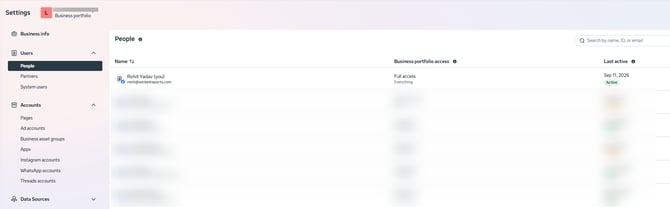
The user connecting Meta to Wicked Reports must have Admin/Full Control access in the client’s Meta Business Manager.
Partner access to a client’s ad account does not always provide permission to create custom conversion events in the client’s Business Manager.
If an agency user cannot complete the connection, the client can either:
- Add that person directly to the client’s Business Manager with Admin/Full Control access; or
- Have someone from the client’s team with the required access log into Wicked Reports and complete the connection.
Recommendations for Best Results
Conversion volume
This is a best-practice recommendation, not a technical requirement for enabling Advanced Signal. You can still set up Advanced Signal with lower volume, but Meta may take longer to learn and performance may be less predictable.
For the strongest optimization results, we recommend approximately 50 new-customer conversions per week for an event optimized toward new customers.
How Advanced Signal Works
Wicked Reports receives your order data and identifies important information about each purchase, including:
- Whether the purchaser is a new or repeat customer
- Which products were purchased
Advanced Signal uses that information to create segmented purchase events and send them to Meta through the Conversions API.
Instead of optimizing every campaign toward the same standard Purchase event, you can select the event that best matches the campaign’s objective.
Choose the Correct Advanced Signal Event
For most new customer-acquisition campaigns, use the New Customer Purchase event.
|
Your campaign objective |
Event to use |
Recommended audience |
|
Acquire new customers across all products |
Purchase_NC |
Cold acquisition audiences |
|
Generate purchases from existing customers |
Purchase_RC |
Existing-customer or retention audiences |
|
Acquire new customers for selected products |
Product-specific New Customer event |
Cold audiences with creative for those products |
|
Sell selected products to existing customers |
Product-specific Repeat Customer event |
Existing customers with matching product creative |
The Purchase_NC event includes only qualifying new-customer purchases identified by Wicked Reports, this is useful if you have a low volume of sales and you just want FB to get extra data.
Part 1: Enable Advanced Signal in Wicked Reports
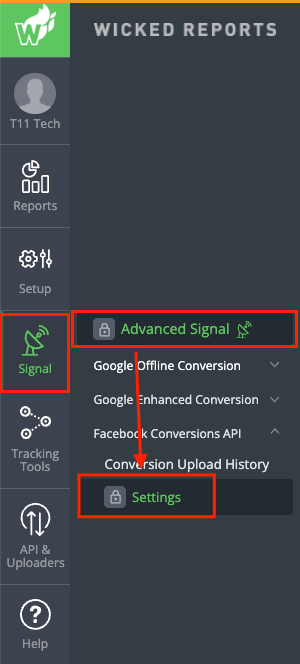
Step 1: Open Facebook Conversions API Settings
- Log into Wicked Reports.
- Open the Signal menu.
- Select Facebook Conversions API.
- Open Settings.
Step 2: Select the Meta destination
Select the correct:
- Meta Business
- Pixel or dataset
Make sure you select the pixel or dataset used by the campaigns that will run Advanced Signal.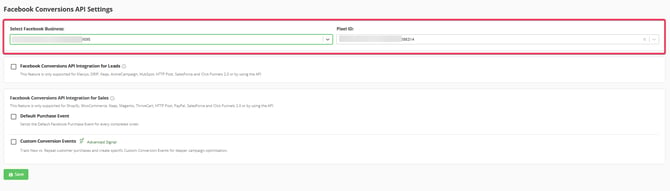
Step 3: Review the Default Purchase option
Wicked may provide an option to send all orders to Meta’s Default Purchase event.
This is separate from Advanced Signal:
- The Default Purchase event sends all qualifying purchases.
- Advanced Signal events segment purchases by new customer, repeat customer, or selected products.
Choose whether to continue sending the Default Purchase event based on your existing Meta CAPI configuration. You can send default purchase event data + segmented data at the same time.
Step 4: Enable Advanced Signal events
Enable Custom Conversion Events (Advanced Signal).
This allows Wicked Reports to create segmented events such as:
- Purchase_NC for new-customer purchases
- Purchase_RC for repeat-customer purchases

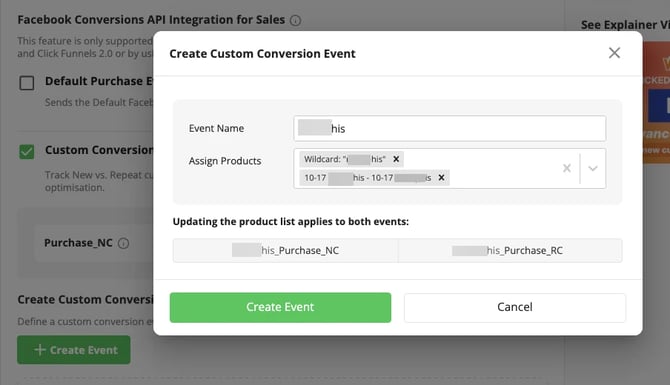
Step 5: Create product-specific events if needed (Optional)
Skip this step if you only want to optimize toward all new-customer purchases using Purchase_NC.
To create a product-specific event:
- Click Create Event.
- Enter a clear event name.
- Select the products or collections that should qualify.
- If available, use matching rules such as “contains” to create a product grouping.
- Click Create Event.
The new event will initially appear with a Draft status.
Step 6: Save your changes
Click Save to finalize your Advanced Signal configuration.
After Wicked successfully creates the event, its status will change from Draft to Created.
Do not leave the page with unsaved changes.
Part 2: Confirm the Event Was Created in Wicked
Before configuring your Meta campaign, confirm:
- The Advanced Signal event shows as Created.
- Orders are continuing to flow into Wicked Reports.
- The correct Meta pixel/dataset is selected.
- Conversion uploads are appearing for the event after qualifying purchases occur.
- Navigate to Signal => Conversion Upload History.
- Open the Facebook Conversion Upload History.
- Locate the Advanced Signal event.
- Confirm that qualifying purchase events are being sent to the intended Meta pixel .
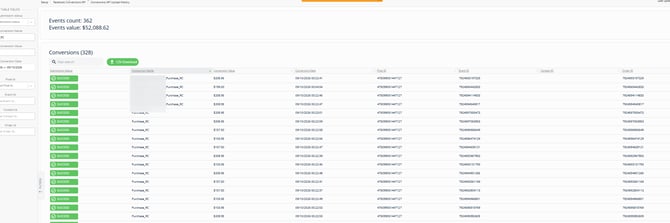
The Wicked portion of setup is complete when the event shows as Created and qualifying conversion uploads begin appearing.
Depending on the order system integration, it may sometimes take up to an hour for conversions to start appearing in the conversion upload history.
Part 3: Verify the Purchase Event in Meta
Once the event has been created in Wicked Reports and qualifying purchases have occurred:
- Open Meta Events Manager.
- Select the pixel or dataset connected in Wicked Reports.
- Find the Wicked-created Advanced Signal event.
- Confirm that Meta is receiving activity for the event.
- Review any diagnostics associated with the event.
Part 4: Use the Advanced Signal Event in Meta Ads Manager
For your first Advanced Signal test, we recommend creating a new ad set instead of changing the optimization event on an established ad set.
Step 1: Create a new ad set or Duplicate an existing adset
In Meta Ads Manager:
- Open an appropriate customer-acquisition campaign or create a new campaign.
- Create a new ad set for the Advanced Signal test.
- Use a separate budget that can support meaningful conversion volume.
- Select the appropriate website, pixel, or dataset.
Do not change the optimization event on an established ad set in the middle of its run.
Step 2: Select the Advanced Signal event
At the ad-set level:
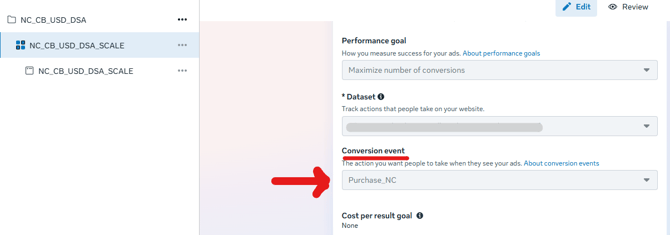
- Locate the Conversion Event setting.
- Select the Wicked-created Purchase_NC event.
- Confirm that you selected the Advanced Signal event—not Meta’s standard Purchase event.
Step 3: Configure the audience and creative
For a new-customer acquisition test:
- Use an appropriate cold acquisition audience.
- Use creative and messaging designed to attract new customers.
- If using a product-specific event, make sure the ads feature the products included in that event.
- Give the ad set enough budget to generate meaningful conversion activity.
The event, audience, offer, and creative should all support the same campaign objective.
Step 4: Publish the ad set
Review the settings and publish the new ad set.
Leave your existing baseline campaign or ad set unchanged so you can compare its performance with the Advanced Signal test.
Avoid creating two identical ad sets targeting the same audience solely to produce a simultaneous A/B test. Identical ad sets may compete against each other and make the results harder to interpret.
Part 5: Run and Evaluate Your Advanced Signal Test
Recommended test structure
For the standard new-customer use case:
- Keep your existing acquisition campaign or ad set running as the baseline.
- Create a new ad set using the Purchase_NC event.
- Use a separate budget.
- Target a suitable cold audience.
- Keep the offer and other major variables reasonably consistent with the baseline.
- Allow the test to run for approximately one sales cycle and receive sufficient event volume before making a final decision.
What to expect during the learning period
Performance may fluctuate while Meta receives the new event data and learns which users are most likely to become new customers.
Do not make an immediate Scale, Chill, or Kill decision based on the first few days.
If the event has very little conversion activity, there may not be enough evidence to determine whether Advanced Signal is improving performance.
Primary success metric
For a Purchase_NC test, use new customer acquisition cost (nCAC) in Wicked Reports as the primary performance metric.
Compare the test against the unchanged baseline over the same evaluation period.
Supporting metrics
You may also review:
- Number of new customers
- Percentage of customers who are new
- New-visit percentage in Wicked Reports
- Spend
- Revenue from new customers
Do not use blended ROAS as the primary measure of a new-customer acquisition test. Blended ROAS includes revenue from both new and repeat customers and may hide whether Meta is becoming better at acquiring new customers.
How to interpret the results
Advanced Signal is showing a positive result when the test:
- Produces a lower or acceptable nCAC compared with the baseline
- Generates more new customers without exceeding your acceptable acquisition cost
- Improves the percentage of customers who are new
- Maintains enough conversion volume for Meta to continue optimizing
The test is inconclusive when:
- The event has insufficient conversion volume
- Meta is still in its learning phase
- The test and baseline are targeting materially different offers or audiences
- Tracking or event-upload issues occurred during the test
Advanced Signal does not guarantee improved advertising performance. It gives Meta an additional segmentation and optimization signal, but Meta’s algorithm, audience, budget, offer, and creative will still influence the result.
Advanced Use Cases
Optimize for new customers purchasing selected products
Use this configuration when you want Meta to find new customers for a particular product or collection.
- Create a product-specific New Customer event in Wicked Reports.
- Select the products or product rules that qualify.
- Save the event and wait for it to show as Created.
- Create a new Meta ad set.
- Select the product-specific New Customer event.
- Use creative that features the products included in the event.
- Verify event activity in Wicked and Meta.
Optimize for purchases from existing customers
Use a Repeat Customer event when the campaign is specifically intended for existing customers.
- Select Purchase_RC or create a product-specific Repeat Customer event.
- Use an existing-customer or retention audience.
- Align the offer and creative with the repeat-purchase objective.
- Evaluate the campaign using repeat-customer volume, acquisition cost, and return on ad spend.
Do not use a Repeat Customer event for a cold new-customer acquisition campaign.
Editing or Deleting an Event
After a custom event has been created:
- You can edit the products associated with the event.
- You cannot rename the event.
- If you need a different name, delete the existing event and create a new one.
- Deleting an event in Wicked stops Wicked from sending new conversion activity to it.
- Deleting the event in Wicked does not remove the existing event from Meta.
- Click Save after editing or deleting an event.
Shopify Native CAPI and Advanced Signal
Shopify’s native Meta CAPI integration sends purchases to Meta’s standard Purchase event.
Advanced Signal provides additional segmented events that allow Meta to optimize toward:
- New-customer purchases
- Repeat-customer purchases
- Purchases involving selected products or collections
You can continue using Shopify’s standard Purchase event for applicable campaigns while selecting the appropriate Advanced Signal event for campaigns with a more specific optimization goal.
Troubleshooting
The event does not appear in Meta
Confirm:
- The event shows as Created in Wicked.
- The correct Meta Business and pixel/dataset were selected.
- The connecting user has Admin/Full Control access.
- Orders are flowing into Wicked.
- Wicked is sending conversion uploads for the event.
- You are viewing the correct dataset in Meta Events Manager.
The event is grayed out
Check whether Meta has received any qualifying events.
Also review Meta Events Manager for:
- Domain-review requirements
- Permission issues
- Dataset or pixel configuration problems
- Other event diagnostics
Some Meta events cannot become fully active until they receive qualifying conversion activity.
An agency user cannot complete the setup
Partner access to an ad account may not provide the required Business Manager permissions.
Either:
- Add the agency user directly to the client’s Business Manager with Admin/Full Control; or
- Have a client administrator complete the connection in Wicked Reports.
Wicked is not showing conversion uploads
Confirm that:
- Orders are successfully entering Wicked Reports.
- The event is enabled and saved.
- The event status is Created.
- The correct pixel or dataset is selected.
- The purchase qualifies for the selected event.
For example, a repeat-customer purchase will not trigger a New Customer event.
A product-specific event is not receiving activity
Confirm that the purchased product matches the product or collection rules configured for the event.
Also confirm that product-level order data is being received by Wicked Reports.
Meta shows more conversions than Wicked Reports
First, confirm that the reporting time zones in Meta and Wicked Reports match.
Meta may also include modeled conversions in its reporting. Because Meta does not provide complete order-level visibility into modeled conversions, its reported total may be higher than the number of events sent by Wicked.
Results are poor during the first few days
Do not immediately stop the test.
Review:
- Whether the correct Advanced Signal event was selected
- Whether the audience matches the event’s objective
- Whether the creative and offer match the intended customer
- Whether the budget supports sufficient conversion volume
- Whether Meta is still learning
- Whether conversion events are flowing consistently
Wait until the approved observation period is complete and the event has sufficient volume before drawing a final conclusion.
Frequently Asked Questions
Can I use Advanced Signal if I have fewer than 50 new customers per week?
Yes. The volume recommendation is a best practice, not a technical requirement.
However, Meta may take longer to learn, and results may be less reliable when the selected event receives limited activity.
Should I add Advanced Signal to an existing ad set?
We recommend creating a new ad set rather than changing the optimization event on an established ad set.
Changing an existing ad set’s optimization event can disrupt its learning and makes it difficult to compare performance before and after Advanced Signal.
Should I use Purchase or Purchase_NC?
Use Purchase_NC when the campaign’s objective is acquiring new customers.
The standard Purchase event includes purchases from both new and repeat customers.
Can I rename an event after creating it?
No. You can edit the products associated with an event, but you cannot rename it. To use a different name, delete the event and create a new one.
Why is my event marked Inactive in Meta?
A newly created event may remain Inactive until Meta receives a qualifying conversion. Confirm that the event was created successfully and that Wicked is sending uploads after qualifying purchases.
Does Advanced Signal guarantee a lower nCAC?
No. Advanced Signal provides Meta with better-segmented conversion data, but performance is still influenced by Meta’s algorithm, audience, budget, offer, and creative.
When to Contact Support
Contact Wicked Reports Support if:
- The event cannot be created in Wicked.
- The event remains missing from Meta after qualifying purchases occur.
- Conversion uploads are failing.
- You receive an error during setup.
- Data is flowing, but you cannot determine whether the configuration is correct.
- Your completed test produces results you cannot interpret.
When contacting Support, provide:
- Your Wicked Reports account name or account ID
- The Meta Business and ad-account IDs
- The pixel or dataset ID
- The Advanced Signal event name
- A screenshot of the event status in Wicked
- A screenshot of the Conversion Upload History
- A screenshot of the event and diagnostics in Meta Events Manager
- The approximate date and time of a qualifying purchase
- A short description of the setup steps already completed