![wicked logo.webp]](https://help.wickedreports.com/hs-fs/hubfs/wicked%20logo.webp?height=40&name=wicked%20logo.webp)
On This Page
Introduction
This document explains how to run a Diagnose and Improve process using Wicked Reports’ Five Forces measurement strategy. It walks through evaluating campaign performance across three key optimization areas:
-
Traffic: Are you bringing in the right visitors to your site?
-
Budget Allocation: Are you spending in the right places?
-
Creative & Offer: Are your ads, landing pages, and products compelling enough?
The Diagnose and Improve process is designed to help you find the cause of underperformance before cutting budget. This gives you the chance to lift campaigns from the Kill Zone into the Chill Zone or Scale Zone. While Five Forces AI can run this process for you automatically every day, running it manually helps you understand which metrics to check, group your findings logically, and take confident action.
Who This Doc is For:
- Users making Kill Decisions
- Teams responsible for diagnosing unprofitable campaigns and improving performance before shutting them down
-
Strategists (weekly routine) and Media Buyers (try-weekly)
What is the Five Forces Measurement Strategy?
The Five Forces Measurement Strategy is Wicked Reports’ process for evaluating campaign performance and making data-driven decisions. It focuses on five strategic areas of optimization:
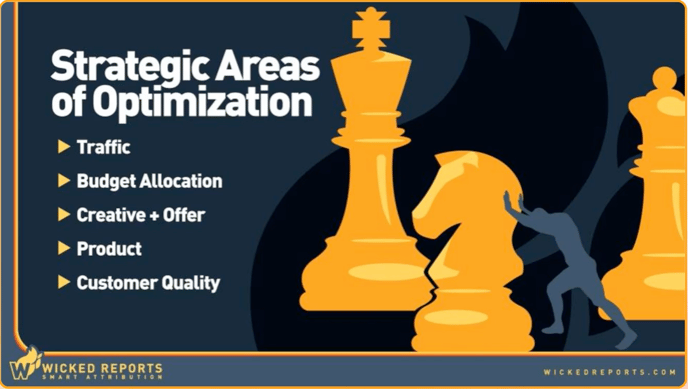
This strategy provides a repeatable way to measure results, identify problems, and take action with confidence. It is also the foundation for Five Forces AI, which can automate this analysis every day.
How to Diagnose and Improve Campaigns
You typically run a Diagnose and Improve review when a campaign has fallen into the Kill Zone, meaning it is unprofitable. Before you shut down something you’ve invested time and money into, pause and diagnose what’s wrong. Often, targeted improvements can lift a campaign back into the Chill Zone or even the Scale Zone.
By working through the three key optimization areas, Traffic, Budget Allocation, and Creative and Offer, you avoid scattered fixes and instead build a logical path to improving performance.
1. Diagnose Traffic Issues
Traffic is always the first thing to check. If the traffic is wrong, nothing else matters. When your traffic doesn't match your intention (goal) then the campaign is not going to be able to the job you are "hiring" it to do. For example, here are some common use cases to check:
- The mix of new vs repeat customers → If you're trying to get new customers, but the customers you are actually acquiring are repeat customers, then you wont be able to scale your top-line revenue.
-
The percentage of brand new visitors attracted → If you're trying to prospect to cold traffic, but the click traffic is repeat visitors, then the traffic isn't cold and the top of your funnel is junk.
- The effects of AI bidding on the campaign’s intention →If your goal is to fill the funnel with fresh prospects, but Meta’s AI is overriding your settings and shifting your campaign, then this will kill your top of funnel.
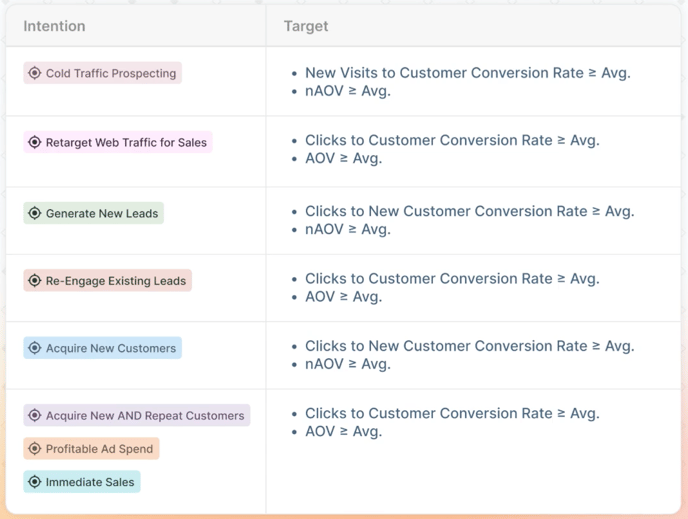
If any of the above issues exist, fix them, confirm in your data that they are resolved, and then restart your measurement period. To make this simple and clear, we recommend using your campaign’s intention as the guide. Each intention has a specific traffic benchmark and improvement actions, shown in the table below.
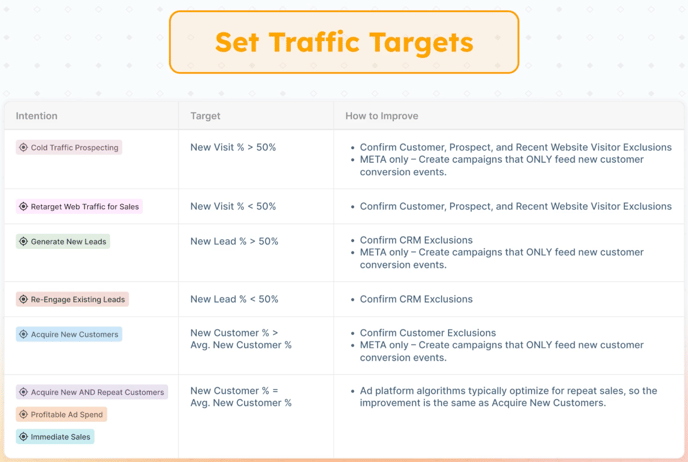
Use the table above to compare your results:
-
Intention: What the campaign was designed to achieve
-
Target: The benchmark that must be met
-
How to Improve: Actions to take if the benchmark is missed
If the campaign is not profitable then take a look to see if the specific intention and target combination benchmark is being met. If it is not, then apply the recommended improvement action.
Best Practice
Meta AI is strong at overall sales, especially retargeting. But, it's weak at acquiring new customers. If your campaign is about new customer acquisition or cold traffic:
-
Turn off Advantage Plus expansion and auto-targeting if possible.
-
For a more advanced fix, train Meta AI by sending custom events for new customer purchases. Wicked Reports Advanced Signal can automate this step for you.
Step 2: Diagnose Budget Allocation
Budget Allocation classifies campaigns into one of three buckets: Scale, Chill, or Kill.
- SCALE: You would increase budget if the target KPI is exceeded
- KILL: You would decrease budget if the target KPI is missed
- CHILL: You would keep budget the same if target KPI is within this range.
Every marketing campaign should have a clear reason for existing, and any audience segmentation you apply helps define its overall intention. That intention is what determines which primary KPI you use to measure success, and the primary KPI's performance is what will ultimately determine the budget adjustments that are needed.
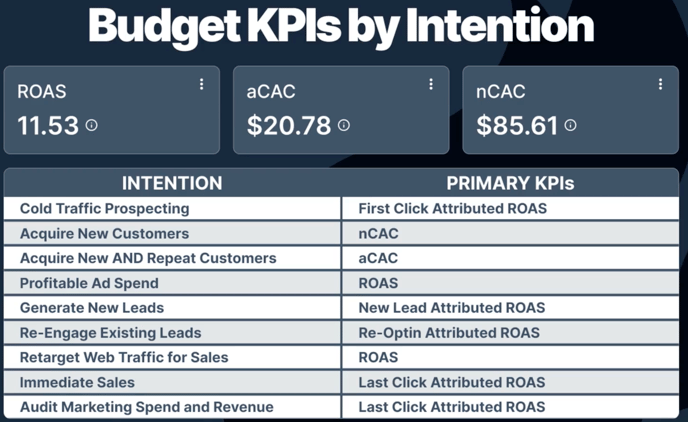
For the campaigns primary KPI, you'll want to set a chill zone range, which is a performance range where you leave the budget unchanged. To help you set the right chill zone based on your campaigns intention, we've created the following chart:
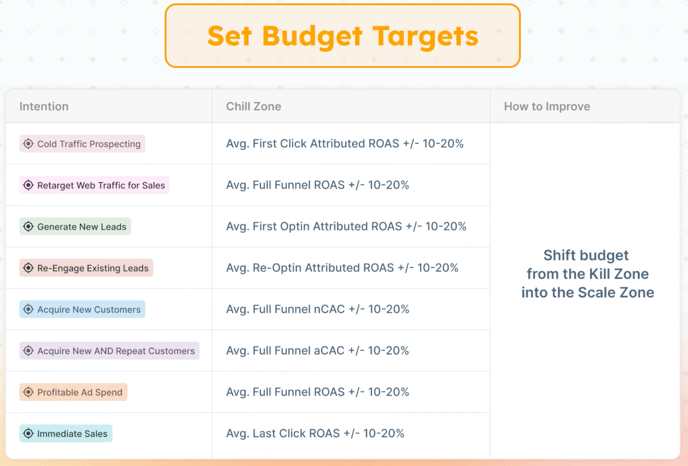
To prevent rapid swings in spend, we've used a 20% margin in our Chill Zone.
Ultimately, here’s how you'll be interpreting and improving performance relative to your Chill Zone:
-
Above Chill Zone (ROAS high or CAC low): Scale your budget.
-
Inside Chill Zone: Maintain your budget.
-
Below Chill Zone (ROAS low or CAC high): Kill it or take action to improve performance
For campaigns in the Kill zone or campaigns starting to underperform, we've seen that one of the most common budget-related causes is simply due to a few ads weighing it down. In this case, we recommend reallocating budget to the winning ads rather than killing the entire campaign.
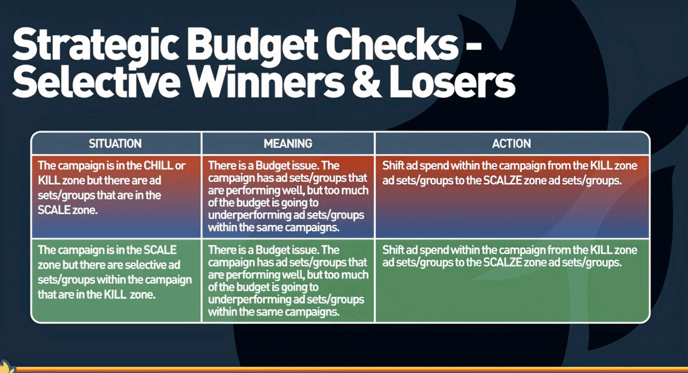
If you are spending in the wrong places, scaling will never happen. Always reallocate budget to your best-performing audiences and ads, protect spend inside your chill zone, and cut what drags performance down. Smart allocation is what keeps your campaigns alive long enough to scale.
Step 3: Diagnose Creative & Offer
Creative and Offer is the final optimization area to review. From an attribution perspective, this means looking at conversion rates and average order value (AOV) segmented by new vs repeat customers.
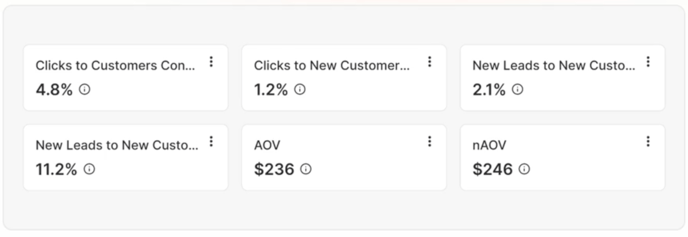
Just like Traffic and Budget, performance here ties directly to your campaign’s intention and its primary KPI. The core difference here is that, when we're trying to market to cold traffic or to generate more customers, we segment the conversion rate or AOV performance to only that population.
Cold audiences converts more slowly compared to retargeting existing customers. So, the only way to evaluate and improve new customer acquisition is to have accurate KPIs on the conversion rate. Evaluating cold and repeat traffic together hides the truth, so segment your data.
Based on the issue, here are some suggestions on how to improve things. This chart touches on the theme and it's a good starting place, but it's by no means an exhaustive list. If benchmarks are missed, apply the recommended improvement actions: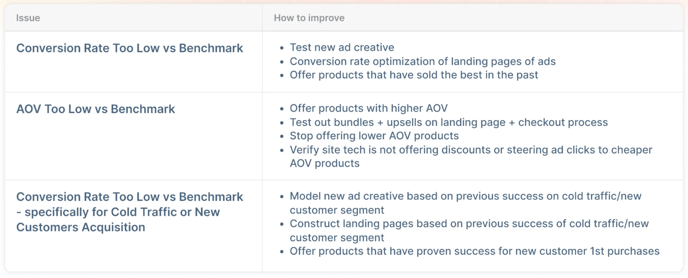
For example, let's look at the last row. If conversion rates are too low compared to the benchmark for a cold traffic or new customer campaign, look to past winners for guidance. Identify products, creatives, or landing pages that previously converted cold traffic at a higher rate and with stronger AOV. Adapt those proven elements to your current offer. If no clear winner exists, the good news is that your data still points to where the work needs to be done.
The process of diagnosing and improving campaigns never ends. Data provides clarity, but only if you revisit it regularly and apply a repeatable framework. By checking traffic first, allocating budget wisely, and refining creative and offers, you create a system that lifts campaigns out of the Kill Zone and positions them to scale.
While this process can be run manually, Five Forces AI can also automate it every day. That means you get daily recommendations on where traffic is breaking down, how budgets should shift, and whether creative is holding up. Manual reviews give you a reliable fallback, while automation ensures you never miss an opportunity to improve.
Commit to running this process consistently, whether by hand or with AI support, and you will always know where to act when a campaign slips, and how to move it back toward scalable growth.