![wicked logo.webp]](https://help.wickedreports.com/hs-fs/hubfs/wicked%20logo.webp?height=40&name=wicked%20logo.webp)
What Is Analyst?
Instead of building a report and interpreting the results yourself, you can start with one of Wicked Reports' pre-built marketing questions or ask your own. Analyst gathers the relevant data, analyzes it, and provides the results along with recommendations when appropriate.
With Analyst, you can:
- Find opportunities to scale profitable marketing.
- Identify campaigns, ad sets, ads, and keywords that may be wasting spend.
- Understand which marketing is driving new customers.
- Analyze customer value and repeat purchasing behavior.
- Turn complex marketing performance into explanations you can share with clients or stakeholders.
When to Use Analyst
Analyst is designed for questions that normally require you to pull together multiple pieces of marketing and customer data before reaching a conclusion.
Here are a few common ways to use it.
Weekly Budget Review
Before making budget changes, ask:
Where should I scale this week?
or:
Which channel can absorb more spend before CAC breaks?
Analyst can evaluate your performance and help identify where additional budget may have the greatest opportunity.
Cutting Waste
Instead of manually searching through campaigns and ads, ask:
Which campaigns are returning zero real pipeline?
or:
Which ads are spending without converting to customers?
You can then investigate the specific marketing identified in the response.
Finding Winners
Use Analyst to identify marketing that deserves additional attention.
For example:
Which ad sets are driving my best new customers?
or:
Which keywords bring my best customers?
Understanding Customer Value
Acquisition cost alone doesn't tell you whether you acquired a valuable customer.
Questions such as:
Which channel brings my highest-LTV customers?
can help you understand whether customers acquired from different marketing sources continue generating value after their first purchase.
Preparing for a Client or Leadership Meeting
Analyst can also turn attribution data into language that's easier to communicate.
For example:
What should I tell my client/boss about last month's spend?
Analyst can provide a concise explanation you can use as the starting point for a client report, presentation, or internal discussion.
Finding a Question
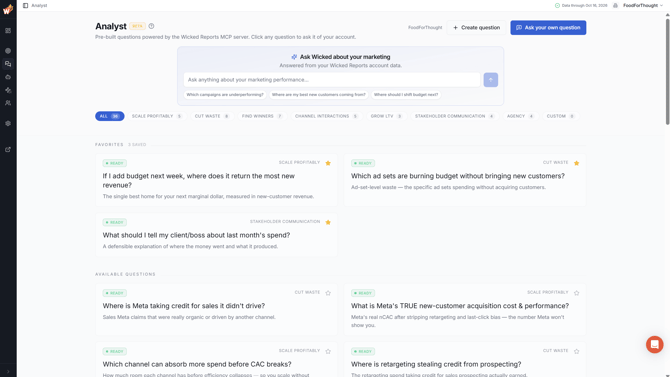
The Analyst page organizes pre-built questions into categories based on the marketing problem you're trying to solve.
Available categories include:
- All
- Scale Profitably
- Cut Waste
- Find Winners
- Channel Interactions
- Grow LTV
- Stakeholder Communication
- Agency
Each category displays the number of questions currently available within it.
Select a category to narrow the page to questions relevant to that type of analysis.

Understanding Question Cards
Each Analyst question appears on a card.
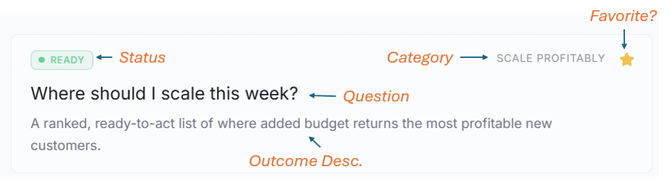
A card includes:
Status — READY questions can be run now. Questions labeled COMING SOON are visible but aren't available yet.
Category — Shows the type of analysis the question belongs to.
Question — The question Analyst will investigate.
What you'll get back — A short explanation of the analysis Analyst will provide.
Favorite — Select the star to save questions you use frequently.
Asking a Pre-Built Question
To run an analysis, select any question labeled READY.
Analyst immediately starts a new conversation and asks the selected question using your account data.
The response appears as the analysis is completed.
Answers can include:
- Written analysis
- Performance metrics
- Tables
- Charts
- Recommendations
The pre-built question is simply the beginning of the conversation.
After receiving the initial answer, you can continue asking follow-up questions in the same conversation.
For example, you might start with:
Where should I scale this week?
Then follow up with:
Why did you recommend Meta?
or:
Which campaigns within Meta should I look at?
Analyst retains the context of the conversation, allowing you to continue investigating the original question rather than starting over.
Ask Your Own Question
You aren't limited to the pre-built questions.
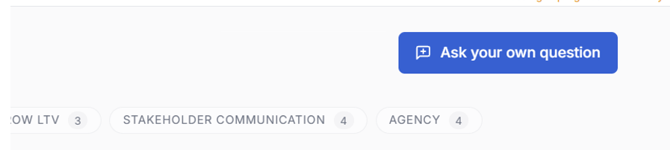
Select Ask your own question to open a blank conversation.
Type your question in plain English just as you would ask a marketing analyst.
For example:
- How did Meta perform last month?
- What caused my new customer acquisition cost to increase?
- Which campaigns should I be concerned about?
- Compare my Google performance over the last several weeks.
- What changed in my marketing performance recently?
Analyst determines the appropriate data and time periods needed to investigate your question based on what you ask.
Be Specific When It Matters
The more specific your question is, the more precisely Analyst can investigate it.
Instead of:
How is Meta doing?
you might ask:
How has Meta performed at acquiring new customers over the last 30 days?
You can always start broadly and use follow-up questions to narrow the analysis.
Create Custom Questions
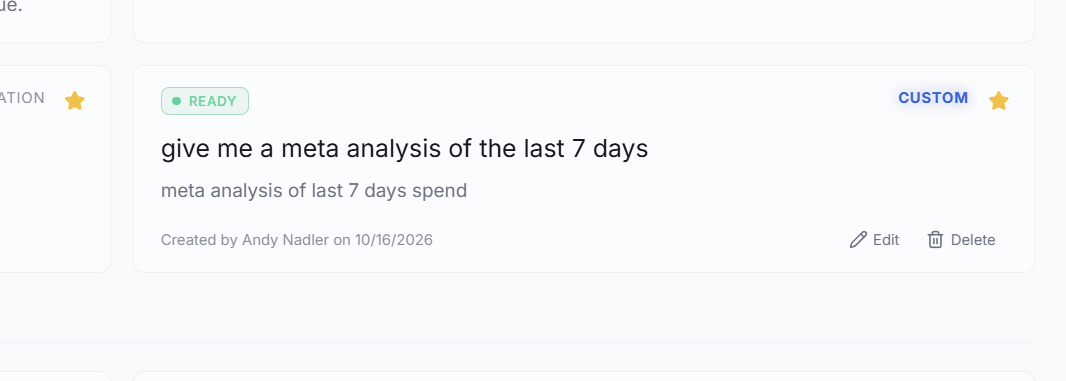
Analyst allows for the creation of custom questions for things you want to regularly ask but don't want to continue having to type in each week, etc.
Creating Custom Questions is simple
- Clicke Create question

- enter your question in the Question prompt
- provide a Question description of the question, for display purposes on the question card
- provide a Background context prompt for any additional contextual information you would like to provide to the AI for analysis
- Click Create question button
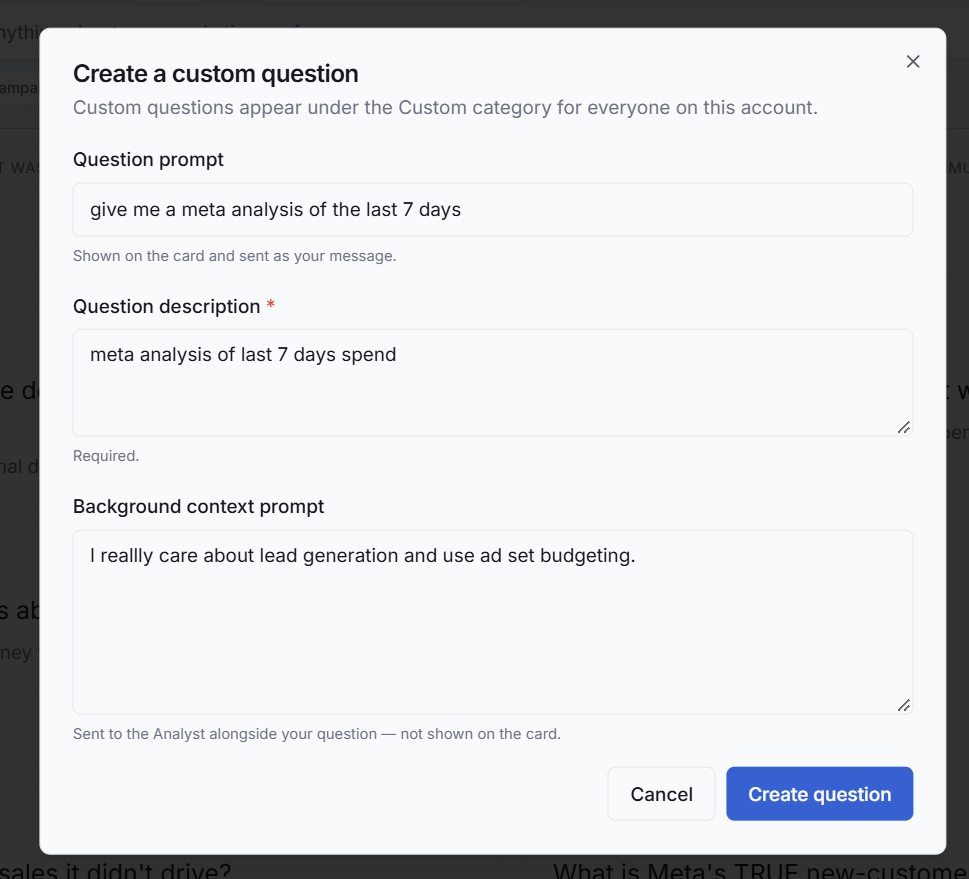
The Custom question will now show up for you as a Favorite and you can edit or delete it at any time.
Whenever you click the question card, the AI prompt will be opened and this question will be sent to our Wicked Reports MCP with the additional background context provided.
Note: Custom Questions can only be edited and deleted by the creater of the question. Custom Questions are only defaluted as favorite for the user who created it. The question is available to all users on the account, but only the creator has it as a favorite by default.
Working With an Answer
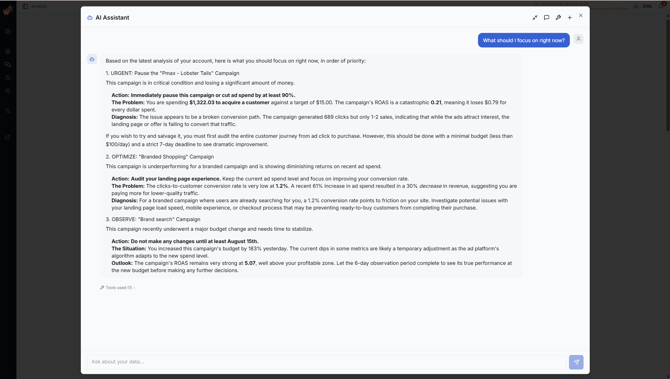
Analyst answers appear directly in the conversation.
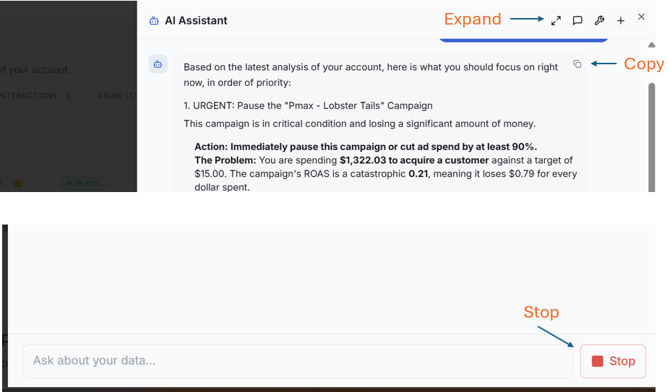
Stop a Response
Answers are generated as the analysis is performed.
Select Stop if you want to halt the current response and ask something different.
Copy an Answer
Select Copy to copy an answer to your clipboard.
This is useful when you want to move an analysis into:
- A client report
- A presentation
- An email
- An internal document
Expand the Conversation
Select Expand to move from the side panel into a full-window conversation.
Collapse the conversation when you want to return to the standard Analyst page layout.
Favorites
Favorites give you quick access to the Analyst questions you use most frequently.
Select the star on any question card to add it to your Favorites.
Favorited questions move into the Favorites section at the top of the Analyst page.
Select the star again to remove a question from Favorites.
Managing Your Conversations
Analyst maintains a history of your previous conversations so you can return to earlier analyses.
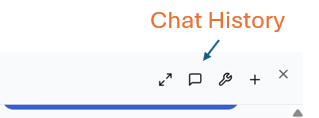
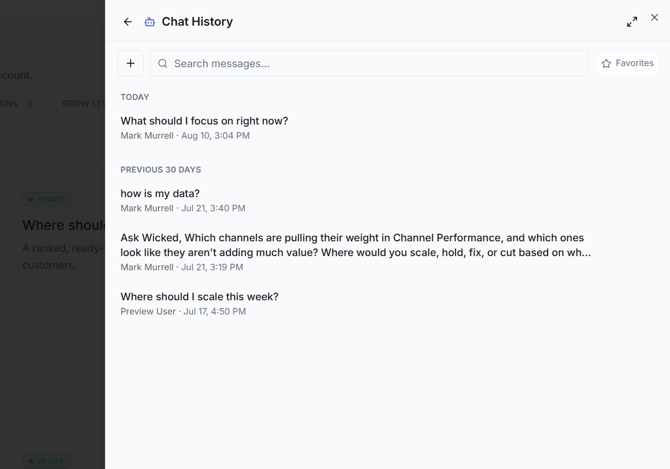
From Chat History, you can:
- Search your previous messages.
- Favorite a conversation.
- Rename a conversation.
- Delete a conversation.
- Reopen a previous conversation.
Select New chat when you want to begin an analysis without the context of your current conversation.
This creates a clean conversation and lets you start with a different question.
Reading Your Analyst Answers
Analyst uses Wicked Reports attribution concepts when evaluating your marketing.
Understanding a few of these concepts will help you interpret its recommendations.
nCAC
nCAC stands for new-customer acquisition cost.
It measures what you spent to acquire genuinely new customers rather than combining new and repeat customers into the same acquisition metric.
This distinction matters because repeat customers may purchase after seeing or clicking advertising even though that advertising wasn't responsible for originally acquiring them.
Analyst frequently uses nCAC when evaluating whether marketing is efficiently creating new customers.
New vs. Repeat Customers
Wicked Reports distinguishes between customers making their first purchase and customers who have purchased before.
This allows Analyst to distinguish between marketing that is acquiring customers and marketing associated with additional purchases from customers you already have.
That distinction can materially change how you evaluate acquisition performance.
LTV
LTV, or lifetime value, represents the revenue a customer produces over time.
A campaign that looks expensive based only on the first purchase may look very different if the customers it acquires continue purchasing.
Analyst can use this longer-term customer value when answering questions about acquisition quality and marketing performance.
Conversion Lag
Customers don't always purchase immediately after clicking an ad.
The time between the marketing interaction and the eventual purchase is called conversion lag.
This means very recent marketing performance is inherently incomplete.
Customers who clicked recently may still purchase days or weeks later.
When interpreting Analyst responses:
- Be cautious when evaluating very recent performance.
- Compare similar periods whenever possible.
- Avoid judging a new campaign before customers have had sufficient time to convert.
Analyst takes Wicked Reports' attribution data into account when performing its analysis, but conversion lag remains important context when making business decisions.
Scale / Chill / Kill
Analyst may use Scale, Chill, or Kill when making recommendations.
These terms come from the Wicked Reports 5-Forces methodology and provide a framework for turning marketing performance into an actionable recommendation.
Rather than looking at a single metric in isolation, the methodology is designed to help determine what action the available evidence supports for a channel, campaign, ad set, ad, or keyword.
When Analyst provides a Scale, Chill, or Kill recommendation, use the supporting analysis to understand why that recommendation was made.
Every recommendation should also be evaluated against your own margins, budget, business objectives, and other information specific to your business.
Available Analyst Questions
The questions below represent the standard Analyst question library. Question wording may vary slightly for some accounts.
Scale Profitably
| Question | What You Get Back |
|---|---|
| What's my true max profitable CAC right now? | Your real ceiling on customer acquisition cost, based on actual LTV — not platform guesses. |
| Where should I scale this week? | A ranked, ready-to-act list of where added budget returns the most profitable new customers. |
| What is Meta's TRUE new-customer acquisition cost & performance? | Meta's real nCAC after stripping retargeting and last-click bias — the number Meta won't show you. |
| If I add budget next week, where does it return the most new revenue? | The single best home for your next marginal dollar, measured in new-customer revenue. |
| Which channel can absorb more spend before CAC breaks? | How much room each channel has before efficiency collapses — so you scale without overspending. |
Cut Waste
| Question | What You Get Back |
|---|---|
| Where is retargeting stealing credit from prospecting? | The retargeting spend taking credit for sales prospecting actually earned. |
| Which campaigns are returning zero real pipeline? | Campaigns spending money that produce no actual new customers. |
| Where is Meta taking credit for sales it didn't drive? | Sales Meta claims that were really organic or driven by another channel. |
| Where am I paying for clicks that never become customers? | Spend going to traffic that clicks but never converts to a real customer. |
| Which ad sets are burning budget without bringing new customers? | Ad-set-level waste — the specific ad sets spending without acquiring customers. |
| Which ads are spending without converting to customers? | Ad-level waste — individual creatives spending without producing customers. |
| Which ad groups are wasting spend? | Ad-group-level waste across Google and Microsoft search. |
| Which keywords cost money without producing customers? | Keyword-level waste — search terms spending without producing customers. |
Find Winners
| Question | What You Get Back |
|---|---|
| Which ad sets are driving my best new customers? | The specific ad sets producing your strongest new customers. |
| Which ads convert best into real customers? | Top-performing creatives by real customer conversion. |
| Which ad groups are my top performers? | Best ad groups across Google and Microsoft search. |
| Which keywords bring my best customers? | Search terms producing your highest-quality customers. |
Channel Interactions
| Question | What You Get Back |
|---|---|
| Which top-of-funnel channel is secretly driving my new customers? | The TOF channel doing the real acquisition work that last-click hides. |
Stakeholder Communication
| Question | What You Get Back |
|---|---|
| Give me the one-paragraph story of what's working this month | A clear, shareable summary of the month's real performance. |
| What should I tell my client/boss about last month's spend? | A defensible explanation of where the money went and what it produced. |
| Help me explain why we're focusing on top-of-funnel and new customers — and why that needs more accurate data that will differ greatly from platform-reported ROAS | Language to justify a TOF / new-customer strategy and the data gap it creates. |
| Give me a concise set of talking points for why we're moving spend from brand to new-customer acquisition | Ready-to-use talking points defending the brand-to-acquisition shift. |
Grow LTV
| Question | What You Get Back |
|---|---|
| Which channel brings my highest-LTV customers? | The channels sourcing customers who are worth the most over time. |
| Which campaigns look expensive on first click but win on LTV? | Campaigns worth more than their nCAC suggests once LTV is counted. |
| Am I acquiring customers who actually come back? | Whether your new customers repeat — the real test of acquisition quality. |
Agency
| Question | What You Get Back |
|---|---|
| Prove this client's paid media drove real pipeline | Hard attribution proof tying paid media to real pipeline and revenue. |
| One-paragraph client report: scale / chill / kill | A client-ready monthly summary ending in clear recommendations. |
Coming Soon
The following questions are visible in Analyst but are still being developed.
They appear with a COMING SOON status and cannot currently be selected.
Find Winners
- What are my best products for new-customer acquisition this month?
- Which campaigns quietly bring my best long-term customers?
- What's actually working that Meta Pixel won't show me?
Channel Interactions
- Which channel, if I cut its spend, would cause the biggest downstream revenue drop across the channels it influences?
- Where are Meta and Google both claiming the same sale?
- What's really behind my "direct" traffic?
- How do my customers actually reach their first purchase?
Agency
- Which client account most needs my attention this week?
- Which client am I at risk of losing because the surface numbers look bad?
Frequently Asked Questions
Why don't Analyst's numbers match Meta or Google?
This is expected.
Meta, Google, and other advertising platforms report conversions according to their own attribution methodologies.
Analyst uses Wicked Reports attribution data, which evaluates marketing across the customer journey rather than simply accepting each platform's self-reported credit.
As a result, the number of customers, revenue, ROAS, CAC, and other metrics reported by Analyst can differ substantially from the numbers shown inside an advertising platform.
Those differences are often exactly what Analyst is helping you investigate.
Why does Analyst sometimes disagree with what an ad platform says is working?
Ad platforms evaluate performance using their own view of the customer journey.
This can give significant credit to retargeting and interactions occurring close to the purchase while obscuring marketing that helped acquire or influence the customer earlier.
Wicked Reports evaluates marketing using its own attribution data, including whether customers are new or repeat and how different marketing interactions contributed to the customer journey.
Analyst bases its conclusions on that Wicked Reports perspective.
Can Analyst benchmark my business against other companies?
No.
Analyst answers questions about your Wicked Reports account and your data.
It does not benchmark your performance against other Wicked Reports customers or industry averages.
Should I automatically follow a Scale, Chill, or Kill recommendation?
Treat every Analyst recommendation as the starting point for a decision, not a replacement for your business judgment.
Analyst can identify patterns and opportunities in your Wicked Reports data, but it doesn't replace your knowledge of your:
- Margins
- Inventory
- Budget constraints
- Business objectives
- Creative strategy
- Operational considerations
Review the supporting analysis before making material budget changes.
Can I ask follow-up questions?
Yes.
A pre-built question starts a normal Analyst conversation.
Once Analyst responds, continue asking questions in the same conversation. Analyst retains the conversation context so you can drill deeper without repeating the original question.
Select New chat when you want to start over without previous conversation context.
How does Analyst know what date range to use?
Analyst interprets the question you're asking and determines the appropriate date range for the analysis.
Some pre-built questions contain an explicit period, such as this week, this month, or last month.
When asking your own questions, include a specific time period when it matters to your analysis.
For example:
Which campaigns acquired the most new customers over the last 30 days?
Need More Help?
If you have questions about Analyst that aren't covered here, contact Wicked Reports Support.