![wicked logo.webp]](https://help.wickedreports.com/hs-fs/hubfs/wicked%20logo.webp?height=40&name=wicked%20logo.webp)
Instead of analyzing dozens of campaigns, reports, and metrics separately, Pulse brings together the most important business and marketing insights into a single view. It helps you quickly understand:
- How your business is performing
- How your marketing investments are performing
- How your marketing investments are expected to perform
- Which channels are driving results
- What opportunities or risks require attention
Pulse is designed to answer the question:
"What happened, why did it happen, and what should I look at next?"

Why Use Pulse?
Marketing data is often spread across multiple reports and platforms.
Pulse consolidates your most important metrics into a single dashboard so you can:
- Monitor overall business performance
- Evaluate marketing effectiveness
- Identify top-performing channels
- Spot emerging trends and problems
- Discover opportunities through AI-generated insights
Whether you're a business owner, marketing director, or media buyer, Pulse helps you quickly understand what matters most without digging through multiple reports.
Understanding Pulse
Pulse consists of four primary modules:
- Customer Converstion Timing
- Business Snapshot
- Marketing Performance Summary
- Channel Performance
- What We're Seeing
Each module answers a different question.
Customer Conversion Timing
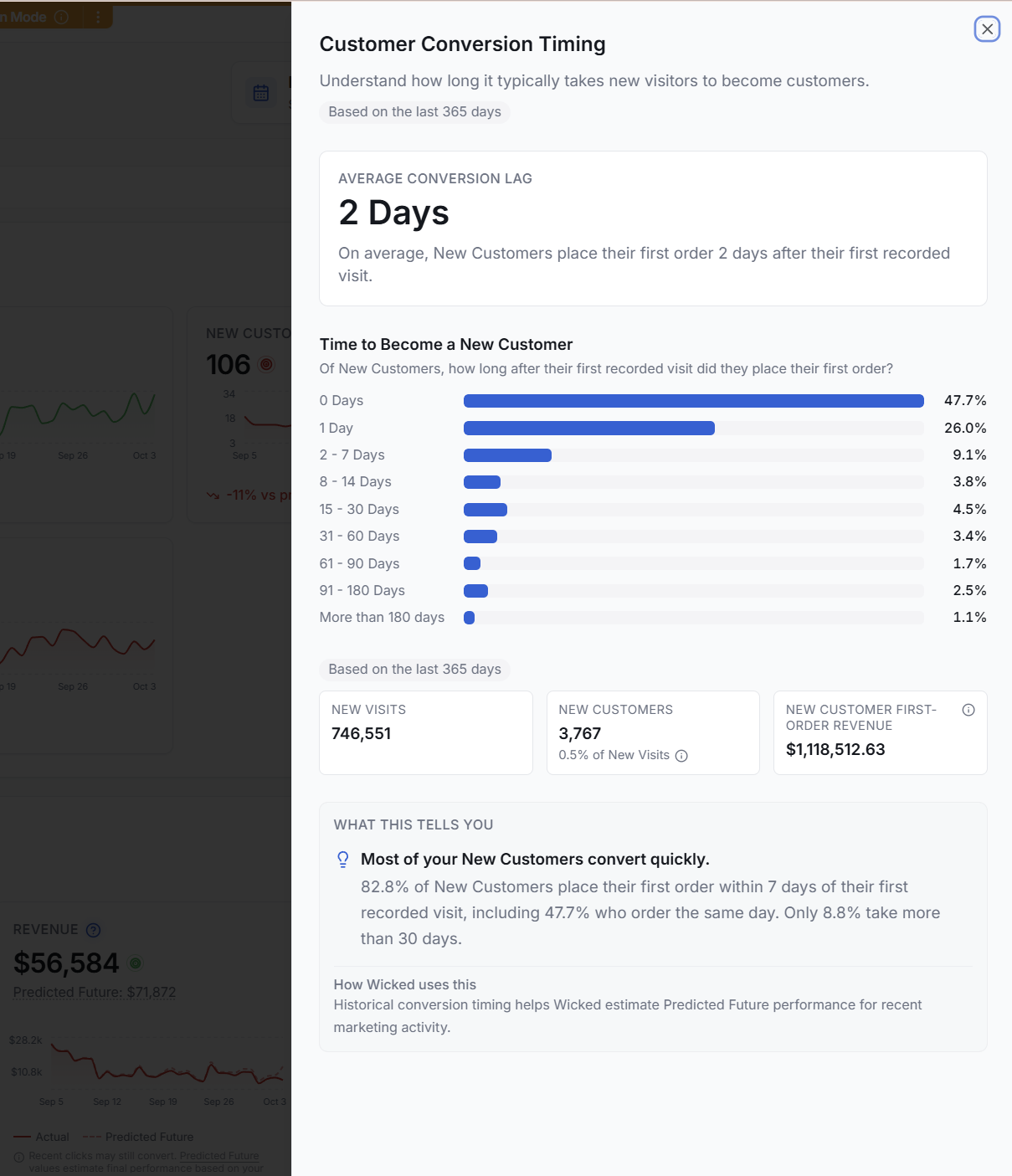
At the top of Pulse, Customer Conversion Timing shows how long it typically takes a new visitor to become a New Customer.
The summary bar highlights two key measurements:
- Average Conversion Lag — the average number of days between a New Customer's first recorded visit and their first order.
- New Customers within 7 days — the percentage of New Customers who place their first order within seven days of their first recorded visit.
These metrics give you quick context for how rapidly new visitors typically convert. A business where most New Customers purchase within a few days has a very different customer journey from one where purchases commonly happen weeks after the initial visit.

View your conversion timing
Select View conversion timing to open the Customer Conversion Timing panel.
The panel uses the last 365 days of customer activity to show the distribution of time between a New Customer's first recorded visit and their first order.
You'll see New Customers grouped by how long they took to convert:
- Same day
- 1 day
- 2–7 days
- 8–14 days
- 15–30 days
- 31–60 days
- 61–90 days
- 91–180 days
- More than 180 days
This helps you see whether your average is representative of most customers or whether your business has a mix of fast- and slow-converting customers.
The panel also summarizes New Visits, New Customers, and New Customer First-Order Revenue for the same 365-day period.
What this tells you
Conversion timing helps you understand how long you should expect it to take before recent marketing activity produces New Customers.
For example, if most of your New Customers purchase within seven days of their first visit, you'll typically get a relatively quick read on recent marketing performance. If a meaningful percentage takes several weeks or months to convert, recent marketing has more opportunity to produce additional customers and revenue over time.
Wicked Reports also uses your historical conversion timing to help estimate Predicted Future performance for recent marketing activity.
Note: Until you have 30 days of Click Tracking data, New Customer Conversion timing will use your New Lead to New Customer timing instead of New Visit to New Customer timing.
Business Snapshot
Answers "How is my business performing?"
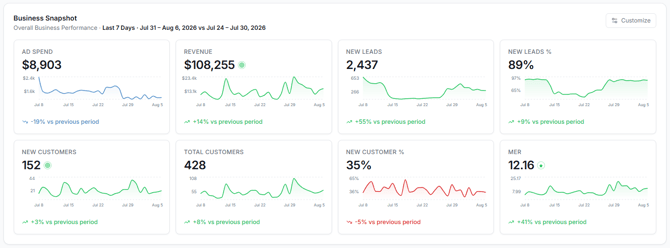
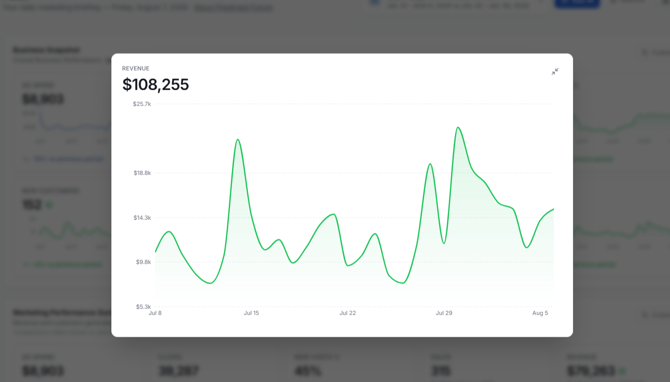
Business Snapshot provides a high-level view of your business results during the selected date range.
Metrics Included
Depending on your account configuration, Business Snapshot may include metrics such as:
- Ad Spend
- New Visits
- New Visits%
- New Leads
- New Leads %
- Sales
- Revenue
- Orders
- New Customers
- Repeat Customers
- Total Customers
- New Customer %
- Average Order Value (AOV)
- Marketing Efficiency Ratio (MER)
How It Works
Business Snapshot uses actual business outcomes that occurred during the selected date range.
This module is designed to provide a clear view of overall business performance rather than the performance of marketing channels.
When To Use It
Use Business Snapshot when you want to:
- Measure overall business growth
- Evaluate revenue trends
- Monitor customer acquisition
- Compare business performance across periods
Marketing Performance Summary
Answers "How effectively is my marketing generating results, and what can I expect from them into the future?"
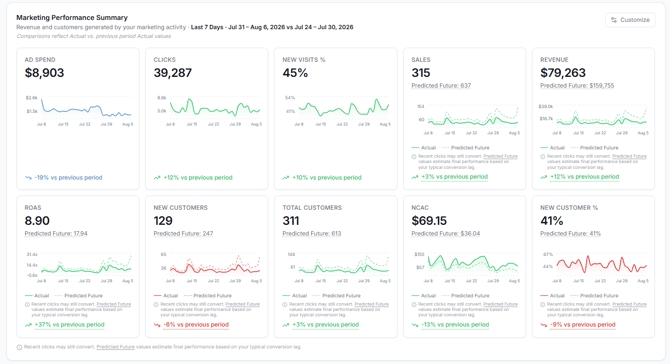
Marketing Performance Summary focuses specifically on marketing performance.
Metrics Included
Common metrics include:
- Ad Spend
- Clicks
- New Visits
- New Visits %
- Sales
- Predicted Future Sales
- Revenue
- Predicted Revenue
- AOV
- Predicted Future AOV
- New Customers
- Predicted Future New Customers
- Repeat Cutomers
- Predicted Future Repeat Customers
- Total Customers
- Predicted Future Total Customers
- New Customer %
- aCAC
- Predicted Future aCAC
- ROAS
- Predicted Future ROAS
- nCAC
- Predicted Future nCAC
- aCAC
- Predicted Future aCAC
How It Works
Marketing Performance Summary evaluates the performance of your marketing investments and attributes results back to the marketing activities that generated them.
Because customers often purchase days or weeks after first engaging with marketing, Wicked Reports applies its attribution methodology and lag modeling to provide a more complete view of marketing performance.
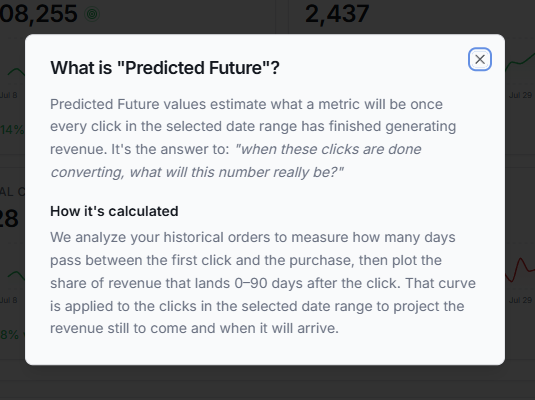
Metrics involving Sales, Revenue and Customers also include a Predicted Future value for the metric. Clicks have a period of time where they will continue to "work" for you. We use your historical account data to understand customer buying patters and apply this to your metrics. This allows us to give you a prediction about the values we expect to see once these clicks are "done converting"
When To Use It
Use this module when you want to:
- Evaluate marketing ROAS
- Monitor acquisition efficiency
- Measure marketing-driven revenue
- Track overall channel effectiveness
Channel Performance
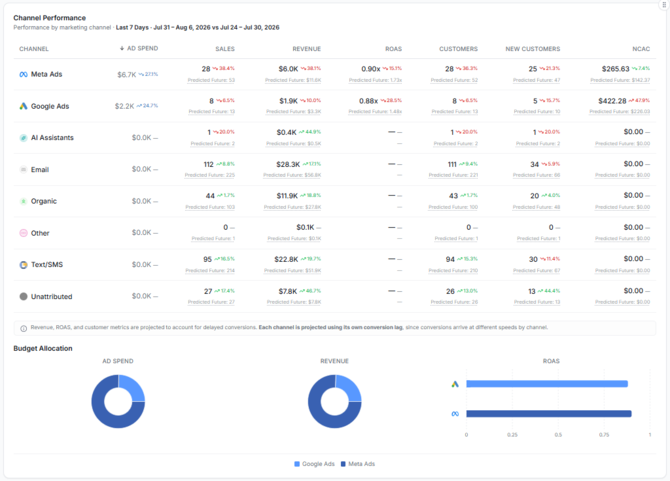
Answers "Which marketing channels are performing best and how we expect them to perform into the future?"Channel Performance compares the effectiveness of each marketing channel.
Metrics Included
Depending on your configuration, Channel Performance may display:
- Ad Spend
- Sales
- Predicted Future Sales
- Revenue
- Predicted Future Revenue
- ROAS
- Predicted Future ROAS
- Customers
- Predicted Future Customers
- New Customers
- Predicted Future New Customers
- nCAC
- Predicted Future nCAC
How It Works
Each row represents a marketing channel.
Examples include:
- Meta
- Google Ads
- YouTube Ads
- SMS
- Influencers
- Organic
- AI Assistants
- Other
The table allows you to compare how efficiently each channel contributes to business growth.
When To Use It
Use Channel Performance to:
- Identify winning channels
- Find underperforming investments
- Reallocate marketing budget
- Evaluate channel-level efficiency
What We're Seeing
Answers "What should I pay attention to right now?"
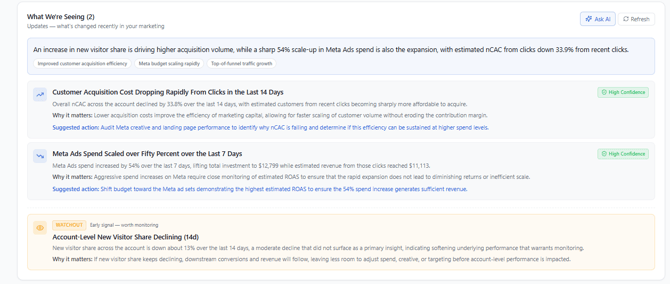
What We're Seeing is an AI-powered insights module that automatically analyzes your marketing and business performance.
 How It Works
The system continuously evaluates:
- Revenue trends
- Marketing efficiency
- Customer acquisition performance
- Channel performance
- Spending patterns
- Emerging opportunities
- Potential risks
When significant patterns are detected, Pulse generates actionable insights and watchouts.
Examples may include:
- A channel significantly outperforming historical trends
- Rising acquisition costs
- Improving ROAS
- Declining new customer growth
- Changes in channel contribution
Insight Confidence
Insights are generated using data-driven analysis and are prioritized based on their estimated business impact.
When To Use It
Review this module first when opening Pulse.
It is designed to quickly surface the most important changes in your business so you know where to focus your attention.
AI Assistant
Pulse includes an integrated AI assistant that can help you better understand your performance.
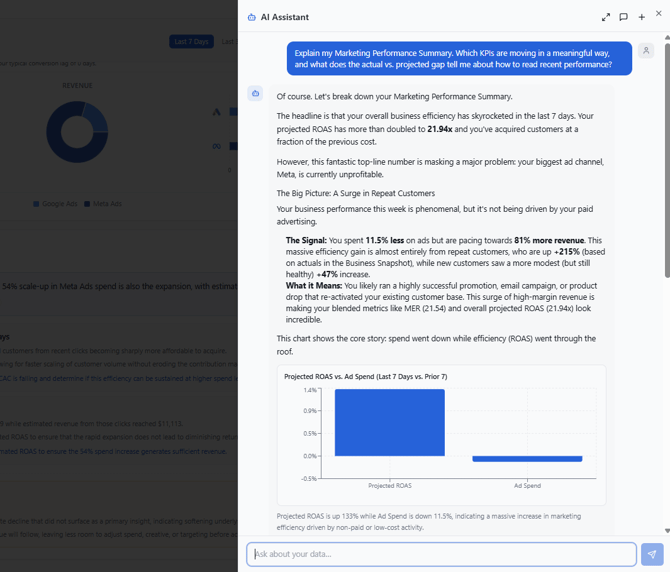
The AI assistant can answer questions such as:
- Why did revenue increase this week?
- Which channels generated the most new customers?
- What changed compared to last period?
- Why did ROAS decrease?
- Which channels should I investigate further?
The assistant uses the data currently displayed in Pulse to provide context-aware answers and recommendations.
Tips
Ask specific questions whenever possible.
Examples:
✅ "Why is Meta revenue down compared to last week?"
✅ "What drove the increase in new customers?"
✅ "Which channel has the strongest ROAS trend?"
Frequently Asked Questions
Why don't my numbers exactly match advertising platforms?
Advertising platforms use their own attribution models and reporting methodologies.
Pulse uses Wicked Reports attribution to provide a consistent view of marketing performance across all channels. The default attribution model used is U-Shpaed (40%, 20%, 40%) of sales directly attributed to clicks in the selected date range.
Why does Marketing Performance differ from Business Snapshot?Business Snapshot focuses on overall business outcomes.
Marketing Performance focuses on attributing those outcomes back to marketing activities.
Because these modules answer different questions, values may differ.
Why do channel totals change over time?Customers often purchase days or weeks after first engaging with marketing.
As additional purchase data becomes available, attributed performance may change.
How often is Pulse updated?Pulse updates daily as new marketing and order data become available in your account.
Which module should I look at first?Start with:
- What We're Seeing
- Business Snapshot
- Marketing Performance Summary
- Channel Performance
This workflow helps you quickly identify important changes before drilling into specific channels.
Can I use Pulse to make budget decisions?Yes.
Pulse is specifically designed to help identify:
- High-performing channels
- Underperforming channels
- Acquisition trends
- Marketing efficiency opportunities
For deeper analysis, use the Attribution Report after identifying an area of interest within Pulse.