![wicked logo.webp]](https://help.wickedreports.com/hs-fs/hubfs/wicked%20logo.webp?height=40&name=wicked%20logo.webp)
On This Page
- What are Attribution Settings?
- Attribution Model
- View-Through Confidence
- Meta Shop Purchases
- Recurring Subscriptions
- Revenue Type
- Custom Conversions
- Applying Attribution Settings
- FAQ
Attribution Settings
Attribution Settings control how Wicked Reports calculates attribution for the current report.
Filters determine what data is shown. Attribution Settings determine how that data is calculated.
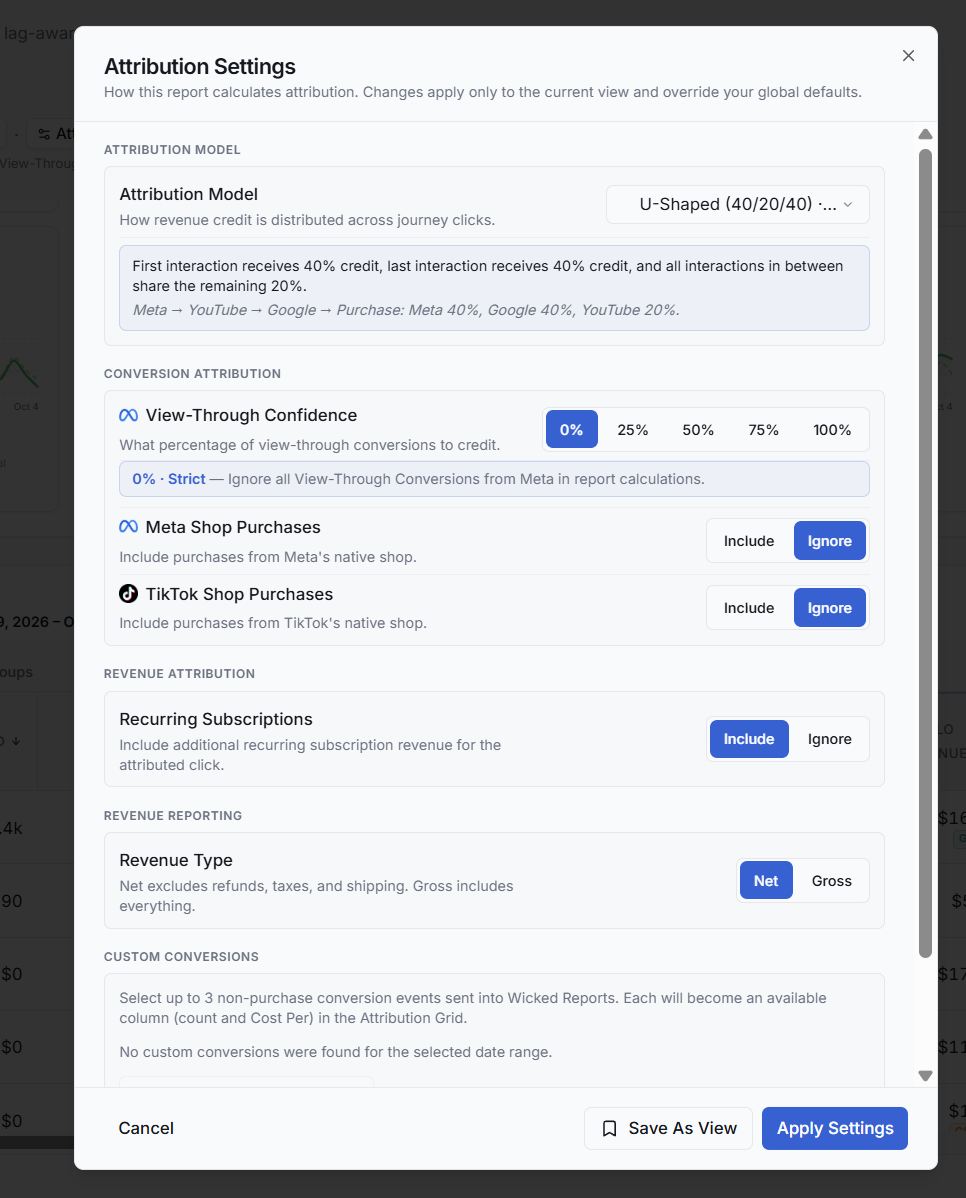
Changes made here apply to the current View and override the account's global defaults.
Attribution Model
The Attribution Model determines how revenue credit is distributed across the marketing interactions in a customer's journey.
Note: A customer's journey consists fo the 90 days prior to an order. If a customer has been a customer for 3 years, when they place an order today, attribution is only looking at their clicks from the previous 90 days to determine attribution.
For example, with U-Shaped (40/20/40) attribution:
- The first interaction receives 40% of the credit.
- The last interaction receives 40%.
- Interactions between the first and last share the remaining 20%.
If a journey were:
Meta → YouTube → Google → Purchase
the attributed credit would be:
Meta 40% → YouTube 20% → Google 40%
Select the attribution model that best represents how you want Wicked Reports to evaluate marketing contribution.
View-Through Confidence
View-Through Confidence determines how much credit Wicked Reports gives to Meta view-through conversions.
Available confidence levels are:
0% · 25% · 50% · 75% · 100%
For example, selecting 50% tells Wicked Reports to include 50% of eligible Meta view-through conversions in the report calculations.
Use this setting to control how strongly you want view-through activity to influence attributed performance.
Meta Shop Purchases
Choose whether purchases completed through Meta's native shop are:
- Included
- Ignored
Use this setting based on whether Meta Shop purchases should be included in your attribution analysis.
TikTok Shop Purchases
Choose whether purchases completed through TikTok's native shop are:
- Included
- Ignored
Use this setting based on whether TikTok Shop purchases should be included in your attribution analysis.
Recurring Subscriptions
Choose whether additional recurring subscription revenue should be attributed back to the attributed click.
Select:
- Include to incorporate subsequent subscription revenue.
- Ignore to exclude that additional recurring revenue and only have a click receive credit for the initial conversion value.
Revenue Type
Choose how revenue should be calculated.
Net Revenue
Excludes:
- Refunds
- Taxes
- Shipping
- Discounts
Gross Revenue
Includes the complete revenue amount. This can be useful to determine if the marketing did it's job of acquiring a sale. Refunds and cancellations may have nothing to do with how the marketing performed.
Choose the revenue definition that best matches how your organization evaluates marketing performance.
Custom Conversions
You can select up to three non-purchase conversion events sent into Wicked Reports.
Selected custom conversions become available as metrics in the Attribution Breakdown, including:
- Conversion Count
- Cost Per Conversion
This allows you to evaluate important actions that occur before or outside of a purchase.
Availability depends on the custom conversion events Wicked Reports has received for the selected date range.
Applying Attribution Settings
Select Apply Settings to apply the configuration to the current report.
Select Save As View when you want to preserve the configuration as a Saved View for future use.
FAQ
What does View-Through Confidence mean?
View-Through Confidence controls how much of eligible Meta view-through conversion activity Wicked Reports includes in attribution calculations.
For example, 50% confidence includes 50% of the eligible Meta view-through conversions.
Use a higher setting when you want view-through activity to have more influence on attribution and a lower setting when you want to be more conservative about assigning credit to impressions without a click.
What's the difference between Gross and Net Revenue?
Gross Revenue includes the complete revenue amount.
Net Revenue excludes refunds, taxes, shipping and discounts.
You can choose the revenue definition that best matches how your organization evaluates marketing performance.
What happens when I include recurring subscriptions?
When Recurring Subscriptions is enabled, additional recurring subscription revenue can be attributed back to the original attributed click.
When it is ignored, that additional recurring revenue is excluded from attribution calculations.