![wicked logo.webp]](https://help.wickedreports.com/hs-fs/hubfs/wicked%20logo.webp?height=40&name=wicked%20logo.webp)
On This Page
- What changed in Wicked 2.0?
- What is Click Date attribution?
- What is Conversion Date attribution?
- Why can Legacy and Wicked 2.0 numbers look different?
- Which report is correct?
- What do Date Range and Future results mean?
- Can I recreate my Legacy view exactly?
- What should I do with my saved Legacy views?
- FAQ
What changed in Wicked 2.0?
The Wicked 2.0 Attribution Report uses Click Date attribution.
Legacy FunnelVision also supported Conversion Date attribution.
These two approaches organize marketing results differently and answer different questions.
A simple way to think about it:
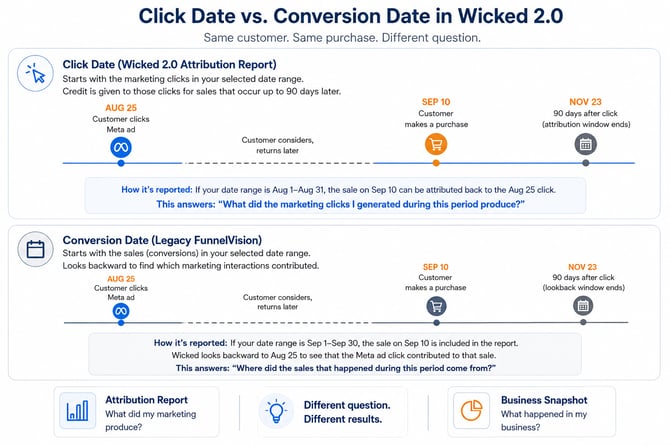
Click Date: What did the marketing clicks generated during this period produce?
Conversion Date: Where did the sales that occurred during this period come from?
Because the starting point is different, you should not expect a Click Date report in Wicked 2.0 to match a Conversion Date report from Legacy one-to-one.
What is Click Date attribution?
Click Date starts with the eligible marketing clicks that occurred during the date range you selected.
Wicked then identifies the sales those clicks generated.
A click can receive credit for a sale for up to 90 days after the click occurred.
Example
A customer:
- Clicks a Meta ad on August 25.
- Returns to your site later.
- Purchases on September 10.
With Click Date attribution, the September sale can still be credited to the August 25 marketing click.
This makes Click Date especially useful for questions such as:
- What did the traffic I bought this month produce?
- Which campaigns are acquiring customers efficiently?
- What is my true nCAC?
What is Conversion Date attribution?
Conversion Date starts with the sales that occurred during the selected date range.
Using the same example, the September 10 purchase would be included when looking at September conversions, and the report would then look backward to identify the marketing that contributed to that sale.
Legacy FunnelVision supported this reporting approach.
Why can Legacy and Wicked 2.0 numbers look different?
Clicks take time to convert.
A click from yesterday has had very little time to generate sales. A click from several weeks ago has had much longer. This timing difference also matters when comparing a recent period with a previous period. See “What do Date Range and Future results mean?” below.
Because Wicked 2.0 associates results with the marketing clicks that generated them, metrics such as revenue, ROAS, customers, and nCAC may look different from Legacy reports using Conversion Date.
The difference can sometimes be significant.
That does not mean one report is wrong. The reports may be answering different questions.
Which report is correct?
Both can be correct.
The important question is what you are trying to measure.
If you want to know:
“What did the marketing I generated during this period produce?”
Use the Wicked 2.0 Attribution Report.
If you want to know:
“What actually happened in my business during this period?”
Use Business Snapshot.
The mistake is comparing the two as though they are measuring the same thing.
Should I compare ROAS between Legacy and Wicked 2.0?
Be careful when comparing them directly.
A Legacy Conversion Date view and a Wicked 2.0 Click Date view can assign revenue to different reporting periods, which can produce different ROAS values even when both are working correctly.
If you are evaluating performance in Wicked 2.0, establish your benchmarks using Wicked 2.0 and compare performance consistently using the same reporting approach.
What do Date Range and Future results mean?
In Click Date reporting, the Date Range identifies the clicks being evaluated.
Those clicks may continue to generate sales after the selected date range ends.
Because a click can receive attribution credit for up to 90 days, the results associated with those clicks can continue to mature over time.
This is why newer clicks often have less observed revenue or fewer customers than older clicks — they have simply had less time to convert.
Why can the current period look worse than the previous period?
When you compare a recent period with the previous period, the two groups of clicks have not had the same amount of time to generate results.
For example, if you compare the last 7 days with the previous 7 days, the clicks in the previous period have already had an additional week to generate sales and revenue.
That means the current period may show lower actual revenue, ROAS, customers, or a higher nCAC even when marketing performance has not actually declined.
This is an important difference when interpreting Click Date reporting: the previous period is more mature than the current period.
Wicked 2.0's Predicted Future helps account for this conversion lag by estimating how recent clicks may continue to generate sales and revenue based on your historical conversion patterns.
When evaluating recent performance, consider both the actual results and Predicted Future before deciding whether performance has improved or declined.
Attribution Report vs. Business Snapshot
Attribution Report
Use the Attribution Report when you want to understand:
What did my marketing produce?
It connects outcomes such as sales, revenue, customers, and nCAC to the marketing clicks that generated them.
Business Snapshot
Use Business Snapshot when you want to understand:
What happened in my business during this period?
Business Snapshot shows metrics that occurred during the selected date range, including:
- Spend
- Leads
- Sales
- Revenue
- New customers
It is not dependent on your marketing attribution filters.
A simple way to remember it
-
Attribution Report = What did my marketing produce?
-
Business Snapshot = What happened in my business?
Can I recreate my Legacy FunnelVision report exactly in Wicked 2.0?
Not necessarily.
Legacy FunnelVision supported attribution settings, including Conversion Date reporting, that do not map one-to-one to the Wicked 2.0 Attribution Report.
Because the underlying reporting models differ, some Legacy views cannot be recreated with identical behavior or identical results.
What should I do with my saved Legacy views?
Rather than trying to force your Wicked 2.0 view to match the exact numbers in Legacy, start with the business question the Legacy view was designed to answer.
For example:
- Which campaigns are acquiring new customers efficiently?
- Where am I wasting spend?
- Which campaigns should I scale?
- How is Meta performing compared with platform reporting?
Then rebuild the view in Wicked 2.0 using the filters, metrics, and attribution model that best answer that question.
The goal is to rebuild the view around the same business question in Wicked 2.0, knowing the results may differ from Legacy because the attribution approaches are different.
FAQ
Does the Wicked 2.0 Attribution Report support Conversion Date?
No. The Wicked 2.0 Attribution Report uses Click Date attribution.
How long can a click receive credit for a sale?
Up to 90 days after the click.
Why is my ROAS dramatically different in Wicked 2.0?
One possible reason is the difference between Click Date and Conversion Date reporting.
Before assuming there is a data problem, confirm that you are comparing the same date range, filters, attribution model, and reporting approach.
If the discrepancy involves missing spend, missing revenue, or data that previously appeared correctly and suddenly stopped, troubleshoot the data connection rather than assuming attribution methodology is the cause.
Is Wicked 2.0 changing my underlying sales data?
No. The attribution report changes how marketing credit is assigned and organized for analysis. It does not change the underlying fact that a sale occurred.
Why can't my Legacy saved views just be migrated?
The attribution models and reporting behavior in Wicked 2.0 do not map one-to-one with Legacy FunnelVision, particularly because Conversion Date is not available in the Wicked 2.0 Attribution Report.
Which attribution model should I use in Wicked 2.0?
Wicked recommends U-Shaped (40/20/40) for most customers.
See Attribution Models in Wicked 2.0: First Click, Last Click, U-Shaped, and Linear for details.