![wicked logo.webp]](https://help.wickedreports.com/hs-fs/hubfs/wicked%20logo.webp?height=40&name=wicked%20logo.webp)
— You configure:
- Which channels Give attribution credit
- Which channels Get attribution credit
- Which channels remain Neutral
- How much credit Gives channels contribute
- How much Gets channels rely on view-based influence
- How Wicked Reports balances Ad Spend and Awareness Influence when distributing credit
Wicked Reports provides a starting configuration based on common channel behavior, but Halo Modeling is designed to be adjusted to reflect how your business actually markets.
Quick Start
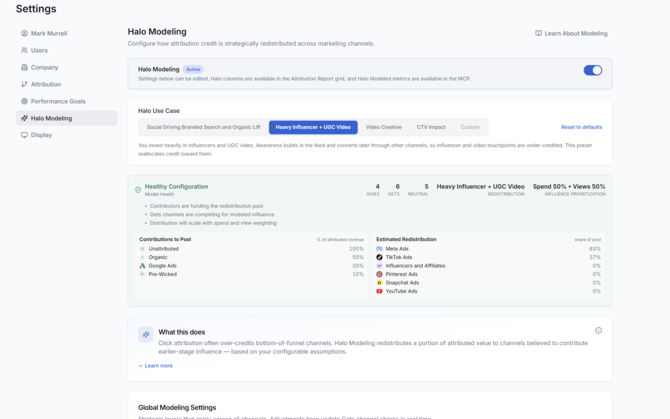
- Go to Settings → Halo Modeling.
- Select the preset that best reflects how your business uses its marketing channels.
- Review the channel roles and only make changes when the preset does not reflect how you use that channel.
- Confirm that Model Health is Healthy.
- Select Save Halo Modeling Settings.
- Open Attribution Report → Columns → Halo Modeled and add the Halo metrics you want to review.
-
After configuring Halo, select Save Halo Modeling Settings to apply your changes.
Start With the Default Configuration
Wicked Reports provides an initial Halo configuration based on how different marketing channels commonly participate in the customer journey.
The default configuration uses:
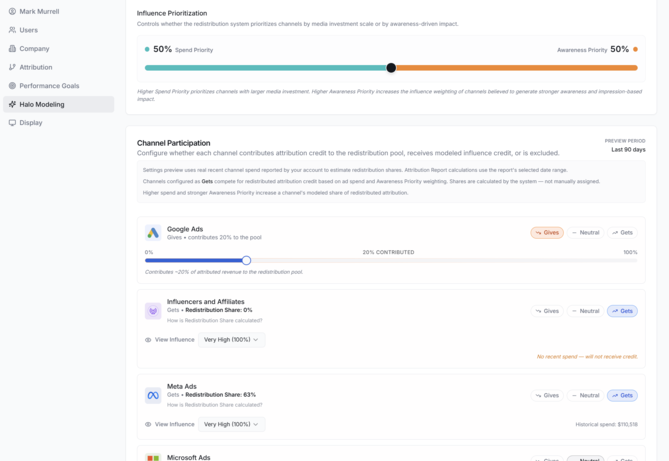
Spend Priority: 50%
Awareness Priority: 50%
And begins with the following channel assumptions:
| Channel | Default Role | View Influence / Contribution |
|---|---|---|
| Google Ads | Neutral | — |
| Influencers | Neutral | — |
| Meta Ads | Gets | 100% View Influence |
| Microsoft Ads | Neutral | — |
| Pinterest Ads | Gets | 100% View Influence |
| Snapchat Ads | Neutral | — |
| TikTok | Gets | 100% View Influence |
| YouTube Ads | Gets | 100% View Influence |
| Amazon (when integrated) | Gives | 20% Contribution |
| AI Assistants | Neutral | — |
| Neutral | — | |
| Organic | Gives | 75% Contribution |
| Other | Neutral | — |
| Text/SMS | Neutral | — |
| Pre-Wicked | Gives | 100% Contribution |
| Unattributed | Gives | 100% Contribution |
These are starting assumptions, not statements that every business should value its channels the same way.
For example, your Meta strategy may rely heavily on video views and awareness, while another advertiser may use Meta primarily for direct-response campaigns that generate substantial trackable clicks.
Use the default configuration as a starting point, then adjust Halo based on how your marketing actually works.
Use Case Presets

Use Halo doesn't require granular setup of the advanced settings. You can start with one of our Halo Use Cases and and go from there
- Social Driving Amazon Revenue (when Amazon is integrated)
- You sell on Amazon and run social ads. Much of the credit those ads earn lands on Amazon rather than on your site, so Meta and TikTok look weaker than they are. This preset moves social credit into view so it can be judged against the sales it actually drives.
- Social Driving Branded Searh and Organic Lift
- Your social ads plant the idea, but customers come back later through branded search or organic listings — so search gets the credit and social looks like it does nothing. This preset returns part of that credit to the social channels that started the journey.
- Heavy Influencer + UGC Video
- You invest heavily in influencers and UGC video. Awareness builds in the feed and converts later through other channels, so influencer and video touchpoints are under-credited. This preset reallocates credit toward them.
- Video Creative
- Video is your lead creative. Its job is awareness and consideration, and purchases often happen later through a click on another channel. This preset gives video channels credit for the demand they create.
- CTV Impact
- Connected TV can't be clicked, so its conversions show up as branded search, direct visits, or organic. This preset gives CTV credit for the lower-funnel activity it sets in motion.
Understanding Gives, Gets, and Neutral
Every channel is assigned one of three Halo roles.
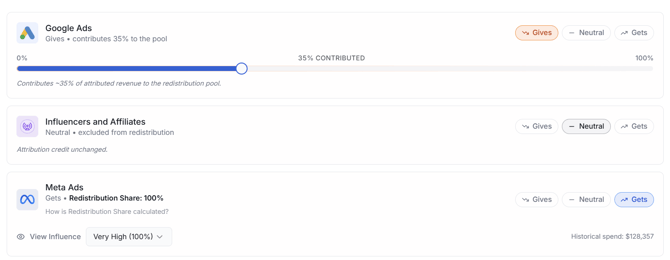
Gives
A Gives channel contributes a portion of its attributed revenue and customers to the Halo redistribution pool.
Think of Gives as:
"I believe this channel is receiving some attribution credit for demand that may have been created somewhere else."
When you select Gives, a contribution slider appears from 0% to 100%.
The selected percentage determines how much of the channel's attribution credit is contributed to the redistribution pool.
For example, setting Organic to:
Gives — 75%
means Halo contributes 75% of Organic's eligible attributed results to the pool while 25% remains with Organic.
The interface estimates the effect beneath the control.
When Might a Channel Give?
A Gives role can make sense for channels that frequently capture existing demand rather than create it.
For example, a customer might:
See a YouTube ad → later search for your company → arrive organically → purchase
Organic receives observable attribution because Wicked Reports can see that interaction. But you may believe YouTube helped create the demand that led to the organic visit.
Configuring Organic as Gives lets Halo account for that possibility.
The appropriate role depends on your marketing strategy. Don't configure a channel as Gives simply because it appears in an example or default configuration.
Why Unattributed Is Always Gives
Unattributed is always configured as Gives and cannot be changed to Gets or Neutral.
This is intentional.
Unattributed means Wicked Reports has a conversion but doesn't have sufficient tracked marketing activity to assign normal attribution credit.
That doesn't necessarily mean marketing had no influence.
For example:
Customer sees Meta ad → later finds your product on Amazon → purchases
If Wicked Reports receives the Amazon order but cannot connect that purchase to the customer's Meta exposure, the revenue may appear as Unattributed.
Offline purchases and other untrackable paths can create similar situations.
Halo allows this Unattributed credit to enter the redistribution pool so eligible paid awareness channels can receive a portion of it.

Gets
A Gets channel is eligible to receive credit from the Halo redistribution pool.
Think of Gets as:
"I believe this paid channel may be creating more demand than click-based attribution can directly observe."
Gets is particularly relevant for awareness and video-driven channels where customers can be influenced without clicking an ad.
Examples can include:
- Meta Ads
- YouTube
- TikTok
When a channel is configured as Gets, two concepts become important:
View Influence
How strongly you believe the channel relies on views and awareness rather than trackable clicks.
Redistribution Share
The percentage of the available Halo pool the channel is currently estimated to receive.
Wicked Reports calculates Redistribution Share automatically.
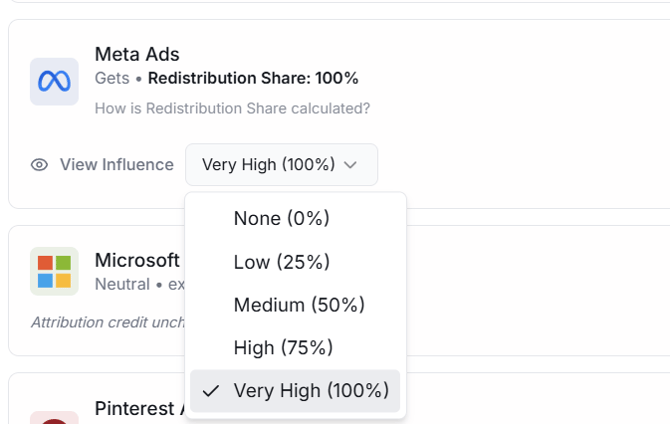
View Influence
For every Gets channel, choose a View Influence level:
| Setting | Influence |
|---|---|
| None | 0% |
| Low | 25% |
| Medium | 50% |
| High | 75% |
| Very High | 100% |
View Influence represents how strongly you believe a channel can influence customers through views and awareness without generating a trackable click.
A higher setting means you believe more of the channel's value may be invisible to click attribution.
For example, you might configure TikTok with greater View Influence than Meta if your TikTok strategy relies primarily on video consumption while your Meta campaigns generate considerably more direct clicks.
View Influence is not a measure of whether the channel is "good" or "bad." It represents the nature of the channel's influence.
Neutral
A Neutral channel doesn't participate in Halo redistribution.
Think of Neutral as:
"I don't currently have a strong reason to adjust this channel's attribution through Halo."
Neutral can be appropriate when:
- You believe existing attribution reasonably represents the channel.
- The channel doesn't clearly create or capture demand.
- You don't have enough evidence to determine how the channel should participate.
- You simply don't want Halo to adjust it.
When in doubt, Neutral is generally preferable to forcing an assumption you don't believe is justified.
How Gets Channels Divide the Pool
After Gives channels contribute attribution credit, Wicked Reports needs to determine how the available pool should be divided among Gets channels.
Halo uses two signals:
Recent Ad Spend and Awareness Influence.
You determine how much emphasis to place on each using the two global priority controls.
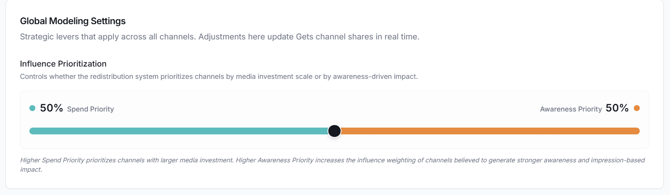
Spend Priority
Spend Priority determines how much weight recent ad spend receives when calculating each Gets channel's share of the redistribution pool.
The basic idea is straightforward:
A paid channel you're actively investing in has more opportunity to create demand than a channel where you're spending very little or nothing.
Suppose both YouTube and TikTok are Gets channels.
If you're investing substantially more in YouTube, Spend Priority helps Halo account for that difference when distributing credit.
Spend does not prove that YouTube created a particular sale. It provides evidence of the relative opportunity each active paid channel had to influence customers.
Awareness Priority
Awareness Priority determines how much weight each Gets channel's configured View Influence receives.
This helps account for the fact that $10,000 spent on two different channels may not produce the same type of customer interaction.
One channel might generate substantial trackable click activity.
Another might primarily generate video views and brand awareness.
Increasing Awareness Priority places greater emphasis on that difference.
Spend Priority + Awareness Priority
Spend Priority and Awareness Priority always add up to 100%.
For example:
50% Spend / 50% Awareness
gives equal weight to both signals.
60% Spend / 40% Awareness
places more emphasis on how much you're investing in each Gets channel.
A Gets channel's estimated Redistribution Share updates based on the combination of:
- Its recent ad spend
- Its View Influence
- Spend Priority
- Awareness Priority
You don't manually assign a Redistribution Share. Wicked Reports calculates it from these inputs.
Why a Gets Channel Needs Recent Spend
A channel can remain configured as Gets even when it isn't currently receiving redistributed credit.
If a Gets channel has no recent ad spend, you'll see:
No recent spend — will not receive credit.
This prevents Halo from assigning current demand-generation credit to advertising that isn't currently running.
For example, suppose YouTube Ads is normally an important awareness channel for your business, but you've stopped spending there.
It wouldn't make sense for Halo to continue assigning YouTube Ads a share of current Halo credit simply because it historically played a top-of-funnel role.
You can leave YouTube Ads configured as Gets. Its Redistribution Share will remain at 0% while there is no qualifying recent spend and can resume when spending returns.
Reading Redistribution Share
Each Gets channel displays its estimated Redistribution Share.
This represents the percentage of the Halo redistribution pool the channel is currently expected to receive.
For example:
| Gets Channel | Redistribution Share |
|---|---|
| Meta Ads | 50% |
| YouTube | 30% |
| TikTok | 20% |
If Gives channels contribute $20,000 of attribution credit to the pool, the model would use these shares to determine how that pool is distributed among the Gets channels.
The share is determined automatically from your Halo configuration.
A high Redistribution Share does not mean Wicked Reports directly observed that percentage of conversions being caused by the channel.
It means your Halo assumptions currently allocate that portion of the redistribution pool to the channel.
Model Health
The Model Health card helps you determine whether your Halo configuration is capable of producing meaningful results.
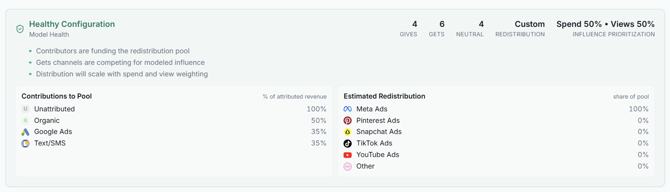
The card summarizes:
- Number of Gives channels
- Number of Gets channels
- Number of Neutral channels
- Redistribution intensity
- Spend vs. Awareness prioritization
- Reasons for the current health status
- Contributions to the pool
- Estimated redistribution
Model Health can be:
Healthy
Your configuration is valid and redistribution should occur as expected.
Weak
Your model can run, but its configuration may result in little or no meaningful redistribution.
For example:
- No Gets channels are configured.
- Gives channels are configured but their contributions are all 0%.
- Total contributions are below 30%.
Weak doesn't necessarily mean your configuration is wrong. It means Halo may have relatively little effect on the results.
Invalid
The current configuration cannot perform the intended redistribution.
For example, you may have Gets channels configured to receive credit but no Gives channels available to fund the redistribution pool.
Review the reasons displayed in the Model Health card to identify what needs to be changed.
Contributions to Pool
When available, the Model Health card includes a Contributions to Pool section.
This lists each Gives channel and its configured contribution percentage.
Use this to quickly review where Halo is taking attribution credit from.
For example:
Organic — 75%
Unattributed — 100%
This is particularly useful after making several channel changes because it lets you review your Gives assumptions in one place.
Estimated Redistribution
The Estimated Redistribution section shows how the pool is currently expected to be divided among Gets channels.
For example:
Meta Ads — 45%
YouTube — 35%
TikTok — 20%
Use this as a reasonableness check.
Ask yourself:
Does this distribution roughly reflect where I believe my paid awareness investment has the opportunity to create demand?
If not, review:
- Channel roles
- Recent spend
- View Influence
- Spend Priority
- Awareness Priority
A Practical Way to Configure Halo
If you're configuring Halo for the first time, you don't need to perfectly model every customer journey.
A practical workflow is:
1. Start With the Wicked Reports Defaults
Review the default roles and 50% Spend / 50% Awareness weighting.
Don't change a setting simply because you can. First determine whether the assumption makes sense for your business.
2. Review Your Gets Channels
Ask:
Which paid channels do I believe create meaningful demand that may not be visible through clicks?
Pay particular attention to video and awareness-heavy channels.
3. Set View Influence
For each Gets channel, consider:
How dependent is this channel on views and awareness compared with trackable clicks?
A channel that generates substantial direct-response click activity may warrant lower View Influence than one primarily used for video awareness.
4. Review Gives
Ask:
Where might my existing attribution be capturing demand that was created elsewhere?
Review the contribution percentage for each Gives channel rather than assuming that all of its attribution should be redistributed.
5. Review Spend vs. Awareness
The default 50/50 configuration gives equal consideration to investment and View Influence.
Change this only when you have a reason to emphasize one signal more strongly.
6. Check Model Health
Make sure the model is valid and review its estimated contributions and redistribution.
7. Perform a Reasonableness Check
Before saving, ask:
If this model were true, does the resulting movement of attribution credit make sense given how we actually market?
Halo Modeling contains assumptions. Those assumptions should reflect your understanding of the business.
8. Save
Select Save Halo Modeling Settings.
Your changes remain draft-only until you save them.
Saving Halo Modeling Settings
When you're satisfied with your configuration, select:
Save Halo Modeling Settings
Until you select Save, your changes are only drafts.
After a successful save:
- Wicked Reports confirms the change.
- The configuration becomes the account's active Halo configuration.
- Updated Halo results are reflected the next time Halo metrics are loaded in Attribution Report.
Halo Modeling Settings apply to the account, not just the individual user who configured them.
Reviewing the Impact in Attribution Report
After saving your configuration, open Attribution Report and add Halo Modeled metrics from the Columns menu.
Useful comparisons include:
Revenue vs. Halo Revenue
ROAS vs. Halo ROAS
New Customers vs. Halo New Customers
nCAC vs. Halo nCAC
This lets you see how your standard attribution results change after applying your Halo assumptions.
Don't evaluate Halo simply by asking whether a channel's number went up or down.
The more useful question is:
Does the redistribution tell a more credible story about how our marketing creates and captures demand?
For detailed instructions, see Using Halo Modeling in Attribution Report.
Frequently Asked Questions
Can a channel be both Gives and Gets?
No.
Each channel can have only one Halo role:
Gives, Gets, or Neutral.
What happens if I set every channel to Neutral?
No Halo redistribution occurs.
There are no Gives channels contributing attribution credit and no Gets channels receiving it, so Halo has no effect on your attribution results.
Unattributed is the exception because it is always locked to Gives.
Why can't I change Unattributed from Gives?
Unattributed is always a Gives channel because these conversions have no qualifying tracked marketing attribution.
Some of that demand may have been influenced by paid awareness marketing that couldn't be directly connected to the eventual purchase.
Halo therefore makes Unattributed available as a source of redistributed credit.
Why does my Gets channel show a 0% Redistribution Share?
A Gets channel with no recent ad spend does not receive Halo credit.
You'll see: No recent spend — will not receive credit.
You can leave the channel configured as Gets. It can become eligible again when qualifying spend resumes.
What happens if all my Gives channels contribute 0%?
No redistribution occurs.
Even if you have Gets channels configured, there is no attribution credit available in the pool for them to receive.
Why does Model Health say Weak?
Weak means Halo can run, but your current configuration may have little effect.
Examples include:
- No Gets channels
- Gives channels contributing 0%
- Total contributions below 30%
Review the explanation in the Model Health card to determine why your configuration is considered Weak.
Why does Model Health say Invalid?
Invalid means your current configuration cannot perform the intended redistribution.
The Model Health card displays the specific reason so you can correct the configuration before relying on Halo results.
Should a Gets channel always have Very High View Influence?
No.
View Influence should reflect how much the channel relies on views and awareness to influence customers rather than trackable clicks.
For example, a video-heavy TikTok strategy might warrant Very High View Influence, while a Meta strategy generating substantial direct-response clicks might warrant a lower setting.
The right value depends on how you use the channel, not simply which platform it is.
Should I change the 50% Spend / 50% Awareness default?
Only if you have a reason to.
The default gives equal consideration to your actual paid investment and your assumptions about view-based influence.
Increase Spend Priority if you want relative investment to play a larger role in determining redistribution.
Increase Awareness Priority if you want View Influence to play a larger role.
Does changing Halo Settings immediately change Attribution Report?
No.
Your changes are drafts until you select Save Halo Modeling Settings.
After saving, the new configuration is used the next time Halo metrics are loaded in Attribution Report.
Does changing Halo Settings change my normal attribution metrics?
No.
Halo Modeling doesn't replace or overwrite your standard Attribution Report metrics.
It produces separate Halo-modeled metrics that you can add to the Attribution Report and compare with your existing attribution results.
How often should I update Halo Settings?
There isn't a required schedule.
Review your configuration when your marketing strategy materially changes—for example, when you:
- Add or remove an important awareness channel.
- Significantly change where you're investing.
- Change a channel from awareness-focused to direct-response, or vice versa.
- Develop better evidence about how channels influence customer demand.
You don't need to continually adjust Halo in response to normal day-to-day performance changes.
How do I know whether my Halo Settings are correct?
There isn't one universally correct Halo configuration.
Halo Modeling is designed to make your assumptions about cross-channel influence explicit and consistently apply them to your attribution analysis.
Start with Wicked Reports' defaults, adjust them based on how your marketing actually works, review Model Health, and then compare your standard and Halo-modeled results in Attribution Report.
The goal isn't to make a particular channel look better. It's to create a more useful view of performance when you have reason to believe click-based attribution is missing meaningful top-of-funnel influence.