![wicked logo.webp]](https://help.wickedreports.com/hs-fs/hubfs/wicked%20logo.webp?height=40&name=wicked%20logo.webp)
Before You Begin
Halo Modeling must first be configured and saved under Settings → Halo Modeling.
If you haven’t completed that step, see Set Up and Configure Halo Modeling.
Halo Modeling uses Actual performance. Predicted Future results are not included in Halo redistribution.
Add Halo Metrics to Attribution Report
-
Open Attribution Report
- Select Columns
- Find the Halo Modeled section.
- Select the Halo metrics you want to add.
You'll find a Halo Modeled section containing the available Halo metrics.

You can add:
| Halo Metric | What It Shows |
|---|---|
| Halo Sales | Attributed sales after Halo redistribution |
| Halo Revenue | Attributed revenue after Halo redistribution |
| Halo nRevenue | Actual nRevenue after Halo redistribution |
| Halo ROAS | Halo Revenue ÷ Ad Spend |
| Halo nROAS | Halo nRevenue ÷ Ad Spend |
| Halo New Customers | Attributed new customers after Halo redistribution |
| Halo Total Customers | Attributed total customers after Halo redistribution |
| Halo nCAC | Ad Spend ÷ Halo New Customers |
When Compare mode is enabled, Halo metrics also include comparison-period values and trends.
Review Halo Metrics Alongside Standard Attribution
The most useful way to analyze Halo is to place the corresponding standard and Halo metrics next to one another.
For example:
| Standard Metric | Compare With |
|---|---|
| Sales | Halo Sales |
| Revenue | Halo Revenue |
| ROAS | Halo ROAS |
| nRevenue | Halo nRevenue |
| nROAS | Halo nROAS |
| New Customers | Halo New Customers |
| Total Customers | Halo Total Customers |
| nCAC | Halo nCAC |
This gives you two perspectives on the same marketing performance.
Your standard attribution metric tells you what your selected attribution model assigned based on the tracked customer journey.
The Halo metric shows how that result changes after applying the assumptions you've configured in Halo Modeling.
Halo does not represent additional business results. If Halo Revenue for a channel is higher than its standard Revenue, Halo is reallocating existing attribution credit to that channel—not discovering additional revenue.
Identifying Gives and Gets in the Report
Halo columns make it easy to see how each channel participates in your Halo model.
Channels participating in redistribution display a role label directly beneath their Halo result:
GETS indicates that the channel receives attribution credit from the Halo redistribution pool.
GIVES indicates that the channel contributes attribution credit to the pool.
Neutral channels don't display a Gives or Gets label because their attribution is not adjusted by Halo.
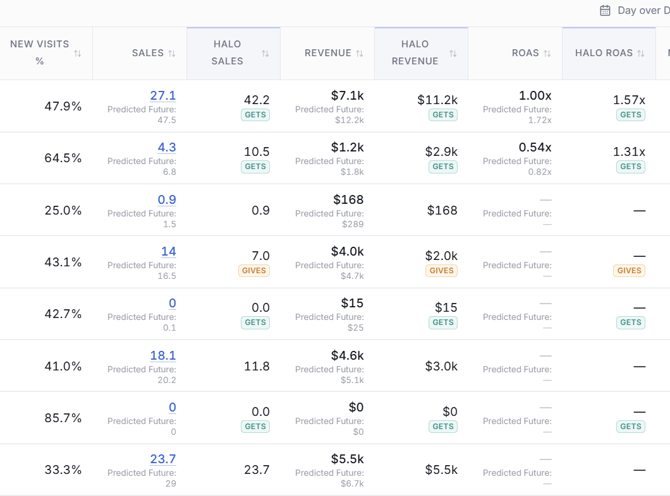
This makes it possible to interpret the modeled result without having to remember how every channel was configured in Halo Settings.
Understanding a Gives Channel
If a channel is configured as Gives, its Halo result will generally be lower than its standard attributed result because some of its attribution credit is being contributed to the Halo pool.
For example:
| Revenue | |
|---|---|
| Revenue | $4,000 |
| Halo Revenue | $2,000 |
If the channel is configured to Give 50%, Halo contributes half of its attributed revenue to the redistribution pool.
Hover over the GIVES label to see the channel's configured contribution percentage.
For example:
Gives channel — donates 50.0% of its attributed value into the halo pool.
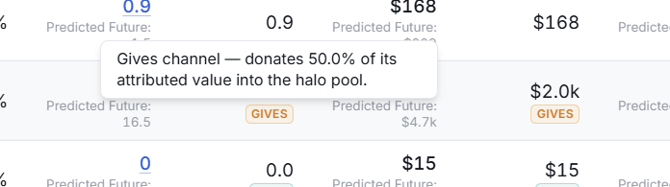
The same concept applies to Halo Sales, Halo New Customers, and the other applicable Halo metrics.
Understanding a Gets Channel
If a channel is configured as Gets, it can receive attribution credit contributed by Gives channels.
For example:
| Revenue | |
|---|---|
| Revenue | $7,100 |
| Halo Revenue | $11,200 |
The additional $4,100 does not mean Wicked Reports discovered $4,100 of new revenue generated by that channel.
Instead, your Halo configuration determined that this channel should receive a portion of the attribution credit available in the Halo pool.
The result gives you a modeled view of what the channel's performance could look like when you account for the top-of-funnel or view-based influence you believe standard click attribution may be understating.
Understanding a Neutral Channel
Neutral channels don't Give or Get attribution credit.
Their underlying attributed results therefore remain unchanged by Halo Modeling.
You also won't see a GIVES or GETS label beneath their Halo metrics.
Neutral is useful as a reference point when reviewing the report because it helps distinguish channels being deliberately adjusted by your Halo model from those left untouched.
Reading Halo ROAS
Halo ROAS is calculated as: Halo Revenue ÷ Ad Spend
This is one of the most useful Halo comparisons because it shows how your assessment of a channel's return changes after Halo redistribution.
For example:
| Meta Ads | |
|---|---|
| Revenue | $100,000 |
| ROAS | 1.80x |
| Halo Revenue | $145,000 |
| Halo ROAS | 2.61x |
Your standard attribution says Meta generated a 1.80x return based on the attribution credit assigned to it.
Your Halo model says that if your assumptions about Meta's broader influence are reasonable, its performance may be better represented by something closer to 2.61x.
That's an important distinction.
Halo ROAS isn't saying:
"We proved Meta actually generated a 2.61x return."
It's saying:
"After accounting for the influence you've modeled for Meta, this is how its attributed return changes."
That makes Halo ROAS an additional decision-making signal rather than a definitive replacement for standard ROAS.
Reading Halo nCAC
Halo nCAC is calculated as: Ad Spend ÷ Halo New Customers
Suppose a Gets channel shows:
nCAC: $120
and:
Halo nCAC: $85
Your standard attribution results indicate that the channel acquired new customers at $120 each.
After Halo redistributes additional new-customer credit to the channel, its modeled acquisition cost becomes $85.
Again, Halo isn't claiming that $85 is the one definitive cost of acquiring a new customer through that channel.
Instead, it tells you how your assessment of acquisition efficiency changes if the channel's top-of-funnel influence is closer to what you've configured in Halo Modeling.
Why Halo Sales and Customer Counts Can Include Decimals
You may see fractional values for metrics such as:
- Halo Sales
- Halo New Customers
- Halo Total Customers
This is expected.
Halo is redistributing attribution credit, not physically moving individual orders or customers between channels.
For example, Halo may allocate portions of customer credit across marketing channels rather than assigning an entire customer to a single channel.
As a result, modeled counts can include decimals.
Drilling Into a Gets Channel
Halo Modeling first determines redistribution at the Channel level.
Once a Gets channel receives its share of the Halo pool, Wicked Reports distributes that Halo credit to lower levels of the channel based on their share of ad spend.
For example, suppose Meta receives $50,000 of additional Halo Revenue.
If:
Campaign A = 60% of Meta spend
and:
Campaign B = 40% of Meta spend
then that additional Halo credit is distributed proportionally:
Campaign A → 60%
Campaign B → 40%
The same principle allows you to drill further through the Attribution Report hierarchy.
Be Careful Interpreting Lower-Level Halo Results
This distinction is particularly important when analyzing Campaigns, Ad Sets/Ad Groups, Ads, or Keywords.
Halo Modeling is identifying influence at the channel level.
The lower-level allocation is based on ad spend.
Therefore, if Campaign A receives more Halo Revenue than Campaign B, you should not interpret that as Wicked Reports having observed that Campaign A specifically generated more untracked influence.
Instead, Campaign A received a larger portion of the channel's modeled Halo credit because it represented a larger portion of the channel's spend.
This makes lower-level Halo metrics useful for allocating the channel-level model into your media-buying hierarchy, but they should be interpreted differently from directly observed attribution.
Drilling Into a Gives Channel
The same principle applies when Halo credit is removed from a paid Gives channel.
If a paid channel contributes attribution credit to the Halo pool, that contribution is distributed across its lower-level rows based on their share of channel ad spend.
For example, if one campaign represents 70% of the channel's spend, it will receive 70% of the channel-level Halo adjustment.
For channels such as Organic where there is no paid spend available for that allocation, the adjustment is distributed evenly across the campaign rows.
A Practical Halo Analysis Workflow
When reviewing Halo in Attribution Report, start at the Channel level before drilling into individual campaigns or ads.
1. Add Standard and Halo Metrics Side by Side
Start with the metric most relevant to the decision you're making.
For revenue efficiency:
Revenue + Halo Revenue + ROAS + Halo ROAS
For new-customer acquisition:
New Customers + Halo New Customers + nCAC + Halo nCAC
2. Identify Your Gives and Gets
Use the labels beneath the Halo values to quickly understand why a result changed.
If necessary, hover over a GIVES label to confirm how much attribution the channel is contributing.
3. Look for Material Differences
Don't focus on every small movement.
Look for channels where Halo meaningfully changes your interpretation of performance.
For example:
Meta ROAS: 1.4x → Halo ROAS: 2.1x
may deserve more investigation than:
YouTube ROAS: 1.9x → Halo ROAS: 1.94x
4. Ask Why the Difference Exists
A large Halo lift for a Gets channel should make sense in the context of:
- Your investment in that channel
- Its role in generating awareness
- How heavily it relies on views rather than clicks
- The Halo Settings you've configured
- Which channels are contributing credit to the pool
5. Compare the Modeled Result With Business Reality
This is the most important step.
Ask questions such as:
Does reducing spend on this channel hurt total business performance more than standard attribution would suggest?
Do customers frequently discover us through this channel but purchase somewhere else?
Is this primarily an awareness channel that doesn't generate many clicks?
Does the Halo-adjusted result better align with what we've observed when scaling or reducing this channel?
Halo is most useful when the model helps explain behavior you're seeing elsewhere in the business.
6. Drill Down Carefully
Once the channel-level result is useful, drill into Campaigns, Ad Sets/Ad Groups, Ads, or Keywords as needed.
Remember that the channel's Halo adjustment is being allocated downward based on spend. Treat these results as an extension of the channel-level model rather than proof of untracked influence from a particular campaign or ad.
Don't Treat Halo as the New "True" Attribution
Halo Modeling is intentionally based on assumptions you configure about how your marketing works.
Those assumptions can provide an important perspective that click attribution alone can't provide.
But Halo shouldn't be interpreted as replacing one definitive number with another.
Instead of asking: "Should I trust ROAS or Halo ROAS?"
A better question is: "What does the difference between ROAS and Halo ROAS tell me about how I'm evaluating this channel?"
If a top-of-funnel channel looks consistently weak under click attribution but materially stronger under a Halo configuration you believe reflects your marketing reality, that's useful information when making budget decisions.
It doesn't mean the Halo result has proven that every redistributed dollar was caused by that channel.
Using Halo to Make Marketing Decisions
Halo can be particularly valuable when deciding whether to scale, maintain, or reduce investment in awareness-heavy channels.
Suppose Meta appears marginal under standard attribution:
ROAS: 1.5x
But your business has repeatedly observed that reducing Meta spend causes:
- Branded demand to decline
- Organic sales to decline
- Unattributed sales to decline
- Total revenue to fall more than Meta's attributed revenue would predict
Your Halo configuration attempts to model that relationship.
If Meta then shows:
Halo ROAS: 2.2x
you now have another signal suggesting Meta's standard attribution may be understating its contribution to the business.
That doesn't automatically mean you should scale Meta.
It means the decision should not necessarily be based on the 1.5x standard ROAS alone.
Use Halo alongside:
- Standard attribution
- Overall business performance
- Spend trends
- Channel strategy
- Your understanding of the customer journey
The purpose of Halo is to help you make a more informed decision—not manufacture a better number for a channel.
Compare Halo Performance Over Time
When comparison mode is enabled, Halo metrics include comparison-period values and trends just like other Attribution Report metrics.
This lets you evaluate not only:
"What is my Halo ROAS?"
but also:
"Is Halo-adjusted performance improving or declining?"
This can be particularly useful after changing marketing investment or channel strategy.
When evaluating changes over time, remember that Halo results depend on your saved Halo configuration. If you materially change your Halo Settings, you're also changing the assumptions behind the modeled results.
Frequently Asked Questions
Should I replace my normal Attribution Report columns with Halo columns?
No.
We recommend using standard attribution and Halo metrics side by side.
The difference between them is one of the most valuable parts of Halo analysis.
Standard attribution shows performance based on tracked customer activity and your selected attribution model. Halo shows how that performance changes after applying your Halo Modeling assumptions.
Does higher Halo Revenue mean Wicked Reports found additional revenue?
No.
Halo does not create or discover additional business revenue.
A Gets channel's Halo Revenue can increase because existing attribution credit was redistributed to it from Gives channels.
Your total business revenue doesn't increase because of Halo Modeling.
What do the GIVES and GETS labels mean?
GIVES means the channel contributes attribution credit to the Halo pool.
GETS means the channel receives a portion of the Halo pool.
Neutral channels don't display either label.
Hover over a GIVES label to see the percentage of attributed value the channel is configured to contribute.
Why are Halo Sales or Halo Customer metrics decimals?
Halo redistributes attribution credit rather than assigning whole individual sales or customers from one channel to another.
That redistribution can produce fractional Sales, New Customer, and Total Customer values.
Why did a high-spend campaign receive more Halo credit?
Lower-level Halo adjustments are allocated based on spend.
If a campaign represents a larger percentage of its channel's spend, it receives a larger percentage of the channel-level Halo adjustment.
Why did my Halo ROAS improve?
Halo ROAS uses Halo Revenue instead of standard attributed Revenue:
Halo Revenue ÷ Ad Spend
If your channel is a Gets channel and receives additional attribution credit through Halo, its Halo Revenue increases and its resulting Halo ROAS may improve.
Why did my Halo nCAC decrease?
Halo nCAC uses Halo New Customers:
Ad Spend ÷ Halo New Customers
If a Gets channel receives additional new-customer attribution credit, its modeled customer count increases. With the same ad spend divided across more modeled new customers, Halo nCAC decreases.
Does Halo use Predicted Future values?
No.
Halo Modeling uses Actual performance.
Predicted Future results are not redistributed through Halo.
Can I sort or filter Attribution Report using Halo metrics?
Yes.
Halo Modeled metrics can be used like other Attribution Report metrics, including for sorting and metric filtering.
Why might Attribution Report take longer to load when I use Halo columns?
Halo results require additional modeling when they're included in your report.
The first load of some date ranges may therefore take longer when Halo metrics are active. Normal report loading indicators will remain visible while the results are being calculated.
Should I make budget decisions using Halo ROAS or Halo nCAC?
Halo metrics can be an important input into a budget decision, particularly for channels where you believe click attribution understates top-of-funnel influence.
They shouldn't be treated as definitive proof of a channel's performance.
Use the difference between standard and Halo performance alongside your marketing strategy, observed business performance, and other evidence about how the channel influences demand.
What if the Halo results don't look reasonable?
Start by reviewing Settings → Halo Modeling.
Halo results reflect the assumptions you've configured about:
- Gives and Gets
- Contribution percentages
- View Influence
- Spend Priority
- Awareness Priority
If the modeled results don't align with how you believe your marketing actually works, review those assumptions rather than treating the Halo output as an unquestionable result.