![wicked logo.webp]](https://help.wickedreports.com/hs-fs/hubfs/wicked%20logo.webp?height=40&name=wicked%20logo.webp)
On This Page
Introduction to the Weekly Review
The Weekly Review provides a consistent weekly narrative, supports team alignment, and turns data into clear actions. This document shows how to run a Weekly Review in Wicked Reports so you can answer three questions with confidence:
- How did we perform?
- What is trending?
- What is our plan for next week?
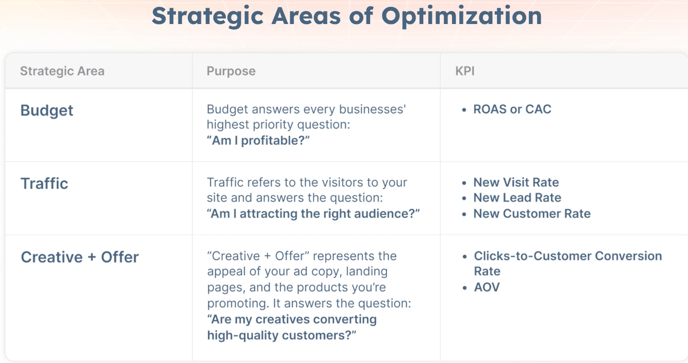
The Weekly Review will, ultimately, drive changes at the campaign level. And, it will do so across your Strategic Areas of Optimization using a six-step process. You will want to use the Weekly Review View for measurement, then apply results to budget, traffic, and creative decisions so every week ends with a clear plan of action and no unanswered questions.
Who This Doc Is For
-
Leaders who want a concise, repeatable weekly narrative
-
Strategists who present weekly performance and set next week’s plan
-
Media buyers who translate the plan into budget and creative moves
What Is the Weekly Review
The Weekly Review routine follows six steps that move from high-level performance down to campaign-level performance, then back up into a clear plan of action for the week. It ensures you understand results, identify risks and opportunities, and align your team on what to do next.
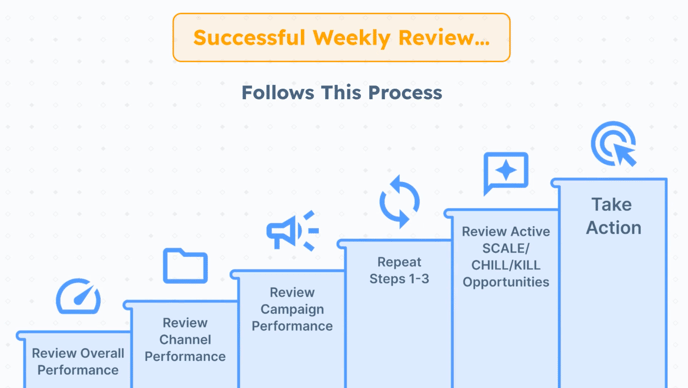
More than just a checklist, it builds a consistent rhythm of accountability that keeps your team aligned and helps leadership trust the narrative you deliver each week. It also creates the foundation for SOPs, team training, and shared decision-making.
-
Review Overall Performance: Begin with Avg. 30-day Full Funnel ROAS as your primary KPI, then group supporting metrics into Budget, Traffic, and Creative + Offer to identify which area shows the greatest pain or opportunity.
-
Review Channel Performance: Compare results across platforms to see where performance gaps exist and decide which channel to analyze first.
-
Review Campaign Performance: Drill into campaign-level data to spot outliers and flag campaigns to scale, hold, or fix.
-
Repeat the Process: Cycle back through steps 1 to 3 to identify additional areas of pain and gain. Each pass allows me to confirm findings, surface additional issues, and build a shortlist of issues and opportunities.
-
Review Active Scale, Chill, Kill Opportunities: Use Scale/Chill and Kill views to validate budget moves and quantify how much spend can be cut, held, or reallocated.
-
Take Action: Align the team, prioritize actions by financial impact, confirm available resources, share your plan with weekly stakeholders, and then turn the plan into execution.
Running this process every week ensures that insights don’t just stay in dashboards. They become a clear, trusted story for your leadership team and a shared action plan that keeps everyone moving in the same direction.
How To Set Up the Weekly Review View
The Weekly Review view is where you’ll run the Weekly Review routine. Check if it’s already pinned in your FunnelVision report, or create it from the 5 Forces template if it isn’t. Here's how: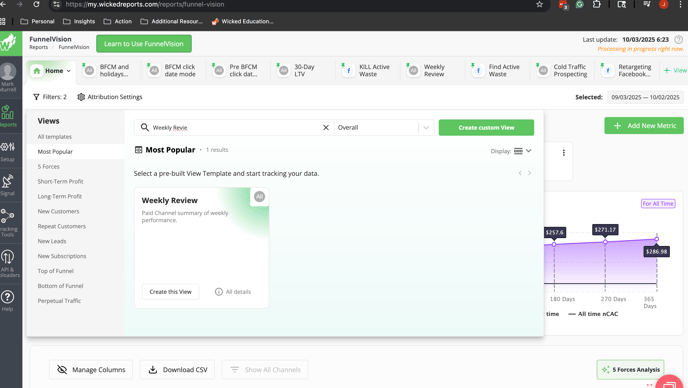
-
Go to your Funnel Vision Report
-
In your Pinned Views, look for the view called Weekly Review. If you don't see it, press the Home Tab dropdown button.
- Search for the view called Weekly Review. If you still don't see it, then you'll need to create it. Press the + View button to get started.
- Select the 5 Forces category
- On the bottom of the Weekly Review template, press the Create View button.
-
Select Check pinned views for Weekly Review.
-
In the modal, leave all of the default filters and press Create and Apply view.
Once you're in the view, you'll see key summary metrics at the top for all campaigns, and stats for the campaigns in the grid.
How to Run the Weekly Review Routine (6 Steps)
The Weekly Review routine is where strategy becomes execution. These six steps take you from a high-level snapshot, into channels and campaigns, and then back into a clear weekly plan. Each step builds on the last so you move beyond reading numbers to knowing exactly where the business is winning, where it is losing, and what to do next.
-
Review Overall Performance
Begin with your 30-day Avg. Full Funnel ROAS (or CAC) as the anchor KPI. Then group supporting metrics into Budget, Traffic, and Creative + Offer to see which area shows the greatest pain or opportunity. Learn more here.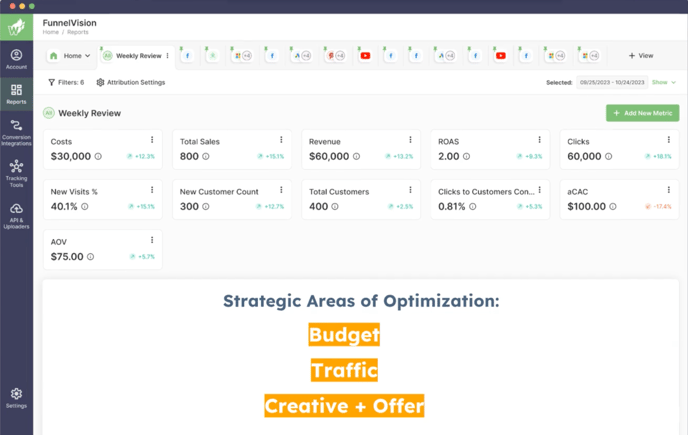
Be sure to apply this process at the Overall level. This baseline view keeps you focused and ensures you start where the impact will be greatest.
-
Review Channel Performance
At the channel level, compare results across platforms to identify gaps using your core channel level KPI. If one channel is clearly underperforming, that is where to dig in first. Learn how to identify weaknesses and areas of opportunities here.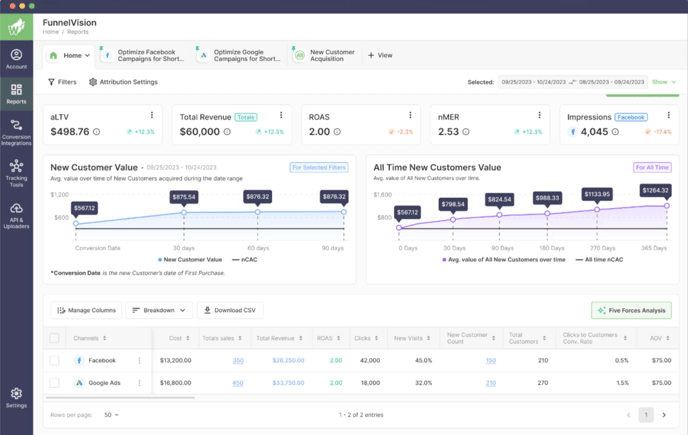
-
Review Campaign Performance
Drill into campaign-level results within the channel you selected. Use naming conventions, such as creative themes, to quickly spot which campaigns are carrying performance and which are dragging it down. Flag weak campaigns for adjustment, note campaigns that can be optimized, and highlight those ready to scale. Learn how to do that here.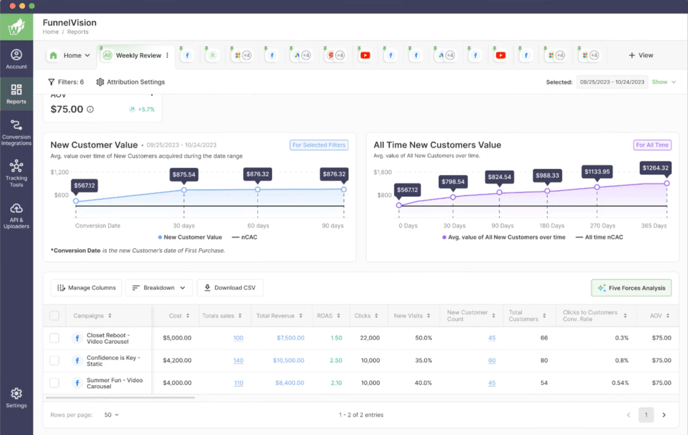
-
Repeat the Process
Run back through steps 1 to 3 to confirm your findings and surface additional issues or opportunities. Each pass strengthens your shortlist of flagged campaigns and prevents blind spots. This list will ultimately be passed to your Media team so they can make deceive action.
-
Review Active Scale, Chill, Kill Opportunities
Move into the Scale/Chill and Kill views to validate your notes. This step shows exactly how much budget can be cut, held, or reallocated. Use filters to focus on the channel and campaigns you are working on, and if our 5 Forces AI is enabled then use it to automate this analysis.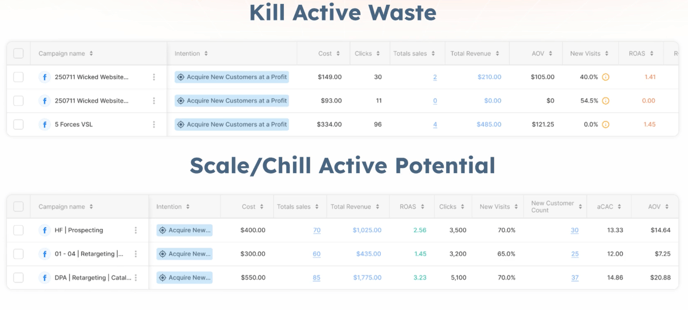
-
Take Action
Turn your shortlist into a weekly plan. Review findings with your team, prioritize actions by financial impact, and confirm resources before shifting spend or testing new creative. Share the plan with stakeholders to secure buy in, then execute so the strategy translates into results.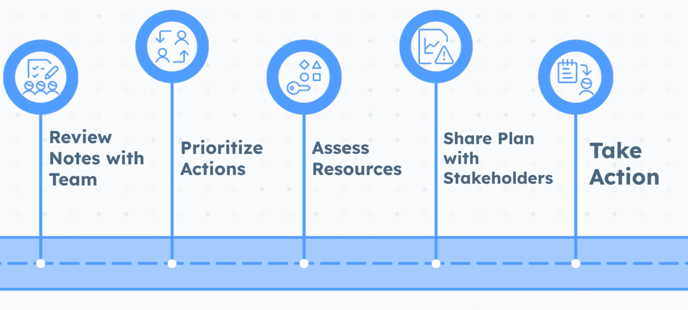
By closing the loop each week, this routine prevents knee-jerk reactions and scattered fixes. Instead, it creates a focused plan your team can act on, ensuring progress compounds week after week.
FAQs
Q: Which KPI should be primary for Budget?
A: Pick ROAS or CAC based on campaign intention. For cross intention rollups, use the overall 30-day average with a Chill Zone margin such as 20 percent.
Q: Can this process be automated?
A: Yes. Wicked 5 Forces AI can scan every campaign daily and provide recommendations for budget moves and creative focus. Manual reviews remain valuable for context and training.